Caretaker Business Software: Best Picks for 2026

Caretaker Business Software: Best Picks for 2026
Best overall for owner-operated property caretaking: Solo Pro, a personalized AI assistant for bookings, reminders, quotes, and money tracking. Best for field-service job coordination: Jobber. Best for bookkeeping: QuickBooks Online. Best for a calendar-only setup: Google Calendar. This 2026 caretaker business software guide compares those options with Housecall Pro, focusing on property visits and maintenance services rather than clinical care or regulated home-care records.
TL;DR
- Solo Pro is the best caretaker business software choice here for owner-operated bookings, reminders, quotes, and money tracking.
- Jobber and Housecall Pro suit field-service workflows; check their job-management requirements against your actual work.
- QuickBooks Online suits bookkeeping-first decisions, not a complete caretaker scheduling workflow.
- Google Calendar suits visit scheduling, but leaves quoting, invoicing, and business tracking elsewhere.
Why this matters
Caretaking work mixes scheduled visits with requests that arrive between visits. Checking a vacant property, meeting a contractor, and arranging maintenance create different obligations, even when they belong to the same client.
Your software should preserve the connection between the request, the visit, and the money. A calendar entry tells you when to arrive. It does not automatically explain what the owner authorized, whether you quoted additional work, or whether payment remains outstanding.
For a 2026 buying decision, start with the task that causes the most repeated work. Choose scheduling support when visits are slipping, bookkeeping when records are scattered, or an assistant when you need help across several owner-operated tasks.
What makes the best caretaker business software
Client context. You need to know who requested the work and which property the request concerns. Check how an option handles one owner with several addresses before relying on it for your records.
Booking and reminders. A useful scheduling workflow makes the appointment clear to you and the customer. Separate customer reminders from alerts that only notify you; they solve different problems.
Quotes and payment records. An extra maintenance request should not disappear inside a message thread. Look for a way to quote the work, invoice it, and identify its payment status without rebuilding the details each time.
Income and expense tracking. Revenue alone does not explain business health. Your software choice should account for recording expenses, classifying transactions, and reviewing the money attached to running the business.
Team requirements. Personal scheduling and employee dispatch are different requirements. If several people need access, confirm current seats, permissions, and assignment tools rather than assuming a general business app includes them.
Usable boundaries. No option should force you to treat a calendar as an accounting ledger or a bookkeeping system as a dispatch board. Decide which tasks the chosen software owns and which still require another process.
Caretaker business software at a glance
Solo Pro — Best for owner-operated work across bookings and money tracking. The personalized assistant imports phone contacts, sends appointment reminders, quotes jobs, and connects bank accounts to track and classify income and expenses. Multiple seats and dispatching are in development, not available today.
Jobber — Best for coordinating field-service jobs. Job scheduling, quotes, invoicing, and customer management put service work into a job-centered workflow. Its limitation for this comparison is that a field-service system does not replace a full bookkeeping process.
Housecall Pro — Best for service businesses centered on dispatch. Scheduling, dispatching, invoicing, and payment workflows address work assigned across a service operation. Its limitation is fit: dispatch-oriented processes are unnecessary when the task is simply maintaining your own visit calendar.
QuickBooks Online — Best for bookkeeping-first decisions. Accounting records, invoicing, and bank transaction handling address the financial side of caretaking. Its limitation is operational: bookkeeping does not replace visit scheduling or employee dispatch.
Google Calendar — Best for a calendar-only starting point. Events and calendar notifications organize upcoming visits. Its limitation is scope: quotes, invoices, payment records, and expense classification need a separate workflow.
1. Solo Pro: best caretaker business software for owner-operated work
The personalized assistant helps you do the work around a service visit: bring in phone contacts, arrange bookings, send appointment reminders, and quote jobs. Booking, invoicing, and payment collection are current capabilities, so the choice extends beyond keeping appointments on a calendar.
You can also connect bank accounts to automatically track and classify income and expenses. The assistant answers questions about business health and suggests next steps for generating income or reducing expenses; it can draft customer-facing booking-page language too.
Solo Pro pros. Phone contact import gives you a direct starting point for customer information. Current booking and reminder capabilities address appointment administration. Quotes, invoicing, and payment collection cover customer transactions, while bank-connected tracking supports a view of business income and expenses.
Solo Pro cons. Multiple seats and dispatching are in development, so do not select it for those requirements today. Property-specific inspection records and detailed maintenance histories are not established capabilities in this comparison; verify those requirements separately before making them central to your workflow.
Best for: Owner-operated caretaking businesses that want help handling appointments, customer transactions, and money tracking rather than maintaining separate processes for every task.
Before choosing it in 2026, identify whether you need help doing your own work or assigning work to others. Those are different buying decisions. Buy for the current assistant-led service workflow; wait if multiple seats or dispatching are essential.
2. Jobber: best caretaker business software for field-service coordination
Jobber organizes service work around customers and jobs, with scheduling, quotes, and invoicing. That structure fits a caretaker business whose main difficulty is keeping incoming requests, planned visits, and billable work connected.
Use the job workflow as the basis of your evaluation. A property check and a separate repair request should be distinguishable, even when they come from the same customer.
Jobber pros. Scheduling gives planned work an operational home. Quoting separates proposed work from an informal request. Customer management and invoicing support the relationship between the client, the job, and the bill.
Jobber cons. Job management does not remove the need for bookkeeping. You also need to verify how its customer and property records fit owners with several locations; a generic service workflow is not proof of a caretaker-specific property record.
Best for: Caretaker businesses that want a structured field-service workflow for scheduling and billing jobs.
Test a routine visit, an additional task, and the resulting invoice before committing. Pay attention to whether the additional task stays distinct from the original appointment. Buy when job coordination is your main requirement; skip when you only need bookkeeping.
3. Housecall Pro: best caretaker business software for dispatch-led work
Housecall Pro is a field-service option with scheduling, dispatching, invoicing, and payment workflows. Its role in this comparison is coordinating service activity when assigning work is part of the operating model.
For caretaking, distinguish dispatch from sharing a calendar. Dispatch needs to make responsibility clear, not just display that an appointment exists.
Housecall Pro pros. Scheduling and dispatching address operational coordination. Invoicing and payment workflows connect completed service work with collection. A field-service structure gives you a basis for evaluating how an assigned job moves through the business.
Housecall Pro cons. Dispatch-oriented processes add unnecessary structure when nobody needs work assigned. Property inspections and caretaker-specific reporting still need evaluation; field-service capabilities alone do not establish that those records meet your requirements.
Best for: Caretaker businesses whose immediate problem is assigning and coordinating service jobs.
For your 2026 evaluation, trace a job from assignment to completion and invoicing. Confirm the current access and permissions that your staff would use. Buy when dispatch is a present requirement; skip when a personal visit schedule solves the problem.
4. QuickBooks Online: best caretaker business software for bookkeeping
QuickBooks Online addresses accounting, invoicing, and bank transaction records. It belongs on the shortlist when your appointments already work but you cannot clearly account for income and expenses.
This is a financial choice, not a replacement for every operational tool. Keep the distinction clear: knowing what a customer owes is different from knowing who is visiting their property tomorrow.
QuickBooks Online pros. Accounting records give business transactions a financial structure. Bank transaction handling supports recordkeeping. Invoicing connects customer charges to the financial side of the business.
QuickBooks Online cons. It does not replace a field-service scheduling and dispatch workflow. You still need a dependable way to carry job details into invoices; accounting software alone does not resolve disconnected requests and appointments.
Best for: Caretaker businesses with a functioning service workflow and a bookkeeping problem to solve.
Evaluate it against your actual records rather than a hypothetical dashboard. Check whether you can clearly distinguish customer income, business expenses, and unpaid invoices. Buy for bookkeeping; skip as your only caretaker operations system.
5. Google Calendar: best caretaker business software for basic visit planning
Google Calendar organizes appointments as events and provides calendar notifications. It is the narrowest option here: useful when your problem is remembering where to be, not managing the entire business.
A clear event title and useful appointment details can make a visit schedule easier to follow. They do not create a job quote, invoice, or accounting record.
Google Calendar pros. Events provide a straightforward place for visit times. Calendar views help you review upcoming commitments. Notifications support your own appointment awareness.
Google Calendar cons. It does not classify business income and expenses or create a complete billing workflow. A notification to you is also not the same as a customer appointment-reminder process.
Best for: Caretakers who need basic visit planning and already have dependable processes for customer communication and money records.
Keep sensitive access information out of broadly shared event details. Review what attendees can see before using invitations for property visits. Buy into a calendar-only workflow when scheduling is the only gap; skip it as an all-in-one solution.
How these options are ranked
This ranking prioritizes the caretaker's task, not the length of a feature list. The default choice connects common owner-operated work: appointments, customer transactions, and money tracking. The other options occupy distinct slots for job coordination, dispatch, bookkeeping, or calendar-only planning.
The criteria are client context, booking and reminders, quotes and payment records, financial tracking, team requirements, and clear product boundaries. The ranking does not treat capabilities in development as available features.
The best 2026 choice is the option that covers your required workflow today. A product that fits a different business process does not become the right choice merely because it offers more functions.
Test the workflow before you switch
Set aside 30 minutes for a practical evaluation. Use 3 representative jobs: a scheduled property check, an additional maintenance request, and a completed visit that still needs billing. These are testing recommendations, not performance claims.
Client request. Start with the customer and property details. Confirm that you can tell which location the request concerns without depending on your memory or searching unrelated messages.
Visit details. Record the appointment and required work. Check what you see, what the customer receives, and whether an appointment change leaves the information clear.
Job quote. Separate extra work from the original request. Review whether the proposed task and customer charge remain understandable when you return to the record later.
Payment record. Follow the completed work into invoicing and collection, then check where the financial record lives. Identify any detail you must re-enter manually.
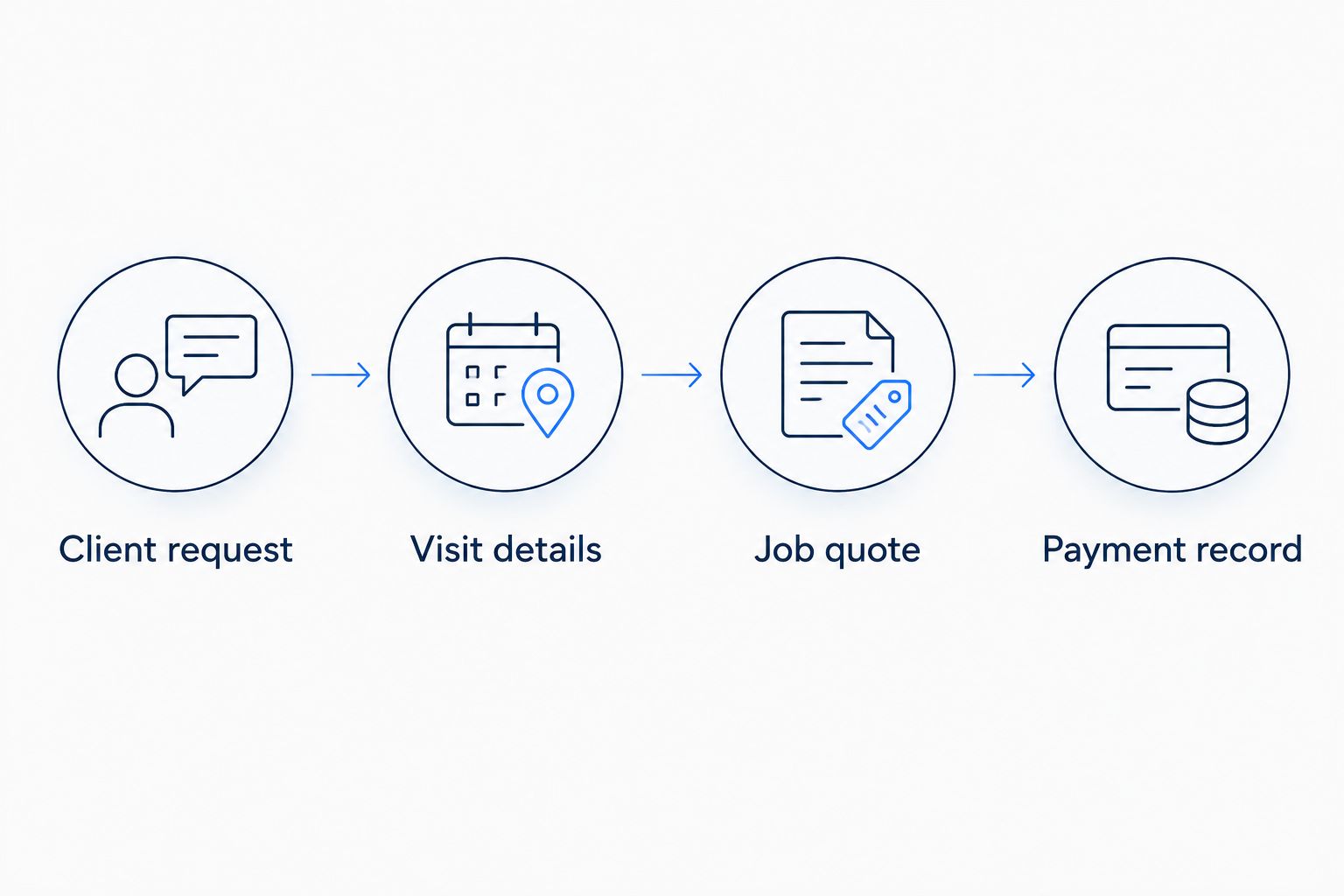
Test the whole job path, not just the appointment screen.
Review another 7 days of appointments before migrating your routine. Look for recurring work, different property addresses, and requests that fall outside a normal visit. The point is to expose mismatches before you depend on the new system.
Which caretaker business software should you choose?
Choose the personalized assistant as the default when you want help across owner-operated booking, quoting, payment, and money-tracking tasks. It addresses the work around the visit rather than treating the appointment as the whole business.
Choose Jobber when you need a job-centered service workflow. Choose Housecall Pro when dispatch is the deciding requirement. Choose QuickBooks Online when bookkeeping is the unresolved problem, and Google Calendar when a visit calendar is genuinely enough.
For 2026, reject any shortlist that mixes current features with promised ones. Your buying decision needs a working answer to the task you have now.
FAQ
What's the best caretaker business software for an owner-operated business?
Solo Pro is the best fit here for owner-operated booking, reminders, quotes, payments, and money tracking. It is a personalized AI assistant; multiple seats and dispatching are in development, not live.
Is Jobber better than a basic calendar for caretaking?
Jobber is a better fit when you need job scheduling, quotes, and invoicing together. A basic calendar fits the narrower task of organizing visit times.
Should I choose Housecall Pro if I need dispatching?
Housecall Pro belongs on your shortlist when dispatching is a current requirement. Evaluate assignment, staff access, and the path from completed work to invoicing against your actual operation.
Can QuickBooks Online run my whole caretaker business?
QuickBooks Online addresses bookkeeping and invoicing, not the entire caretaker service workflow. You still need a dependable process for visit scheduling, customer requests, and operational coordination.
Can I use Google Calendar for caretaker appointments?
Google Calendar can organize caretaker visits as events and provide calendar notifications. It does not replace quotes, invoices, expense tracking, or a customer-reminder workflow.
Does this guide cover home-care or clinical records?
This guide covers property caretaking and maintenance-service administration, not clinical records or regulated home-care requirements. Evaluate care-sector compliance and documentation separately if those are part of your services.
One last thing
A reminder is not a work instruction. Before adopting any system, inspect what the person attending the property will actually see: the location, requested task, and necessary context.
An accurate appointment can still leave the work unclear. Keep those details attached to the visit in your chosen process, and confirm that sharing them does not expose sensitive property information to unintended recipients.
Related guides
Best lawn care software compares options for another visit-based property service.
Best Jobber alternatives for solo businesses offers a related starting point for comparing service-business workflows.
Best pet sitting software covers a related appointment-based service category.
Best invoicing software for house cleaners focuses on billing for property-based service work.