Best Handyman Business Software: Solo Pro Leads in 2026

Best Handyman Business Software: Solo Pro Leads in 2026
Best overall for owner-operated service work: Solo Pro, a personalized AI assistant that helps quote jobs, remind customers, collect payments, and track money. For handyman business software in 2026, choose Jobber for structured job management, Housecall Pro for dispatch-led operations, QuickBooks Online for accounting, or Google Calendar with a spreadsheet for a manual starting point.
TL;DR
Why this matters
A handyman job involves more than an appointment. You need to understand the request, agree on scope, prepare a quote, show up, document changes, invoice, and collect payment. Software should support the parts you struggle to keep straight.
The best choice is the system that closes your biggest operational gap. A calendar does not replace bookkeeping. Accounting software does not organize a repair visit. A dispatching system solves a different problem from an assistant that helps an owner decide what to do next.
For your 2026 shortlist, start with the work you repeatedly postpone: sending quotes, reminding customers, collecting payments, or reviewing expenses. Choose around that task rather than the longest feature list.
What makes the best handyman business software?
Customer context. You need a usable record of who requested the work and what you agreed to do. Check how you bring existing contacts into the system and find them again before another visit.
Quotes and scope. A useful quote describes the job clearly enough for the customer to understand what is included. Look for a workflow you can use between visits, not one that requires recreating the same information later.
Bookings and reminders. Separate finding an appointment slot from reminding the customer about it. Test both, including what happens when the appointment changes.
Invoices and payment collection. Check the path from completed work to an invoice and collected payment. Do not assume that a product handling one step also handles every other step you need.
Money visibility. Income and expenses belong in the decision, not just the calendar. Decide whether you need practical business-health guidance, detailed accounting, or both.
Team coordination. Shared access and dispatching matter when different people need to manage or receive assignments. Verify current capabilities; a development plan is not an available feature.
Handyman business software at a glance
Solo Pro — Best for owner-operated service work with assistant support. Its standout is combining practical tasks such as phone-contact imports, appointment reminders, job quotes, and automatic income and expense classification with business-health questions. Multiple seats and dispatching are in development, not available today.
Jobber — Best for structured job management. It brings customer records, scheduling, quotes, and invoicing into a field-service workflow. Its limitation for an accounting-first buyer is that job management is not the same as a full accounting system.
Housecall Pro — Best for dispatch-led operations. Scheduling and dispatching sit alongside estimates, invoicing, and payment collection. Its limitation is fit: an owner who needs money classification and practical business guidance should evaluate those requirements separately.
QuickBooks Online — Best for accounting-led administration. Its focus is recording financial activity, invoicing, and accounting reports. Its limitation is that it is not a handyman scheduling and dispatch system.
Google Calendar with a spreadsheet — Best for a manual starting point. The standout is a simple arrangement for appointments and custom job records. The limitation is responsibility: you maintain the connections between appointments, quotes, invoices, and payments yourself.
1. Solo Pro: best for practical assistant support
Solo Pro is a personalized AI assistant for service businesses, starting with owner-operated teams. It can instantly import contacts from a phone, connect bank accounts to automatically track and classify income and expenses, send appointment reminders, quote jobs, and draft customer-facing booking-page language. Booking, invoicing, and payment collection are current capabilities.
For a handyman, the distinction is practical: the assistant helps do work rather than only providing places to store information. You can ask about business health and get suggested next steps for generating income or reducing expenses.
Pros: contact setup. Bringing contacts in from your phone gives you a way to start with customer information you already have.
Pros: money tracking. Connected bank accounts support automatic tracking and classification of income and expenses. That addresses financial recordkeeping alongside customer-facing work.
Pros: customer administration. Quotes, booking-page wording, appointment reminders, invoicing, and payment collection cover relevant tasks around a service visit.
Pros: next-step guidance. Business-health questions connect the financial picture to practical decisions about income and expenses.
Cons: team coordination. Multiple seats and dispatching are in development. Do not choose it today on the assumption that staff logins or dispatch assignments are available.
Best for: Owners who want help managing customer work and understanding business money, without needing live multi-seat dispatching.
Verdict: Buy for assistant-supported service administration; skip for a dispatching requirement today.
2. Jobber: best for structured job management
Jobber is field-service software for managing customers and jobs. Its workflow includes scheduling, quotes, invoicing, and payment collection, making it a relevant option when your main problem is keeping each job organized from request to completion.
Compare it using a real repair request. The useful question is whether the job record stays clear as you move from an initial description to agreed work and an invoice.
Jobber pros: job organization. Customer and job records give service work a more structured home than scattered messages and calendar notes.
Jobber pros: quoting and invoicing. These functions support the commercial steps around the job, rather than leaving scheduling as a disconnected task.
Jobber pros: scheduling. A field-service scheduling workflow is relevant when appointments need to sit alongside customer and job information.
Jobber cons: accounting scope. Do not treat a job-management purchase as a replacement for every bookkeeping or accounting requirement. Evaluate financial reporting separately.
Jobber cons: workflow fit. A structured job system is not automatically the right answer if your main need is help classifying expenses or deciding how to improve business income.
Best for: Handyman businesses that want a consistent job-management process across customer records, schedules, quotes, and invoices.
The Jobber alternatives guide provides another comparison point when that workflow is your starting requirement.
Verdict: Buy for job organization; hold if accounting or assistant-led business guidance is the main gap.
3. Housecall Pro: best for dispatch-led operations
Housecall Pro is field-service software with scheduling, dispatching, estimates, invoicing, and payment collection. It belongs on your shortlist when assigning and coordinating work is a central requirement rather than an occasional inconvenience.
For a 2026 decision, demonstrate the assignment workflow with the people who will actually use it. A feature name alone does not show whether your office and field staff can follow the same job without confusion.
Housecall Pro pros: dispatching. Dispatch functionality directly addresses assigning service work, a different requirement from keeping your own appointment calendar.
Housecall Pro pros: service workflow. Estimates, scheduling, and invoicing cover several stages of customer work within a field-service product.
Housecall Pro pros: payment collection. Payment collection belongs in the operational comparison alongside getting the job booked and completed.
Housecall Pro cons: accounting fit. A service-management system still needs evaluation against your accounting requirements. Dispatching does not establish the financial workflow you need.
Housecall Pro cons: requirement mismatch. If you do not need dispatching, that strength should not decide the purchase. Compare the tasks you will use, not the capabilities another business needs.
Best for: Handyman operations where assigning work and coordinating field activity are central to the software decision.
Verdict: Buy for dispatch-led operations; hold if customer follow-up and money administration are your immediate priorities.
4. QuickBooks Online: best for accounting-led administration
QuickBooks Online is accounting software with invoicing, transaction recording, and financial reporting. Choose this category when your central problem is understanding and maintaining business accounts rather than organizing appointments.
For handyman work, it answers a different part of the software question. A financial record of a customer transaction is not the same as a complete record of the requested repair, scheduled visit, and assigned worker.
QuickBooks Online pros: accounting focus. Financial records are the core purpose, rather than a secondary view of a job schedule.
QuickBooks Online pros: invoicing. Customer invoicing supports the billing side of completed work.
QuickBooks Online pros: financial reporting. Accounting reports help you review the business through its recorded financial activity.
QuickBooks Online cons: job scheduling. It is not a replacement for a dedicated handyman booking and dispatch workflow.
QuickBooks Online cons: operational separation. If you manage appointment details elsewhere, you still need a clear process for connecting completed work to billing. Do not assume that connection is automatic.
Best for: Businesses whose biggest unresolved task is bookkeeping and accounting, with customer scheduling handled separately.
Verdict: Buy for accounting; skip as the sole answer to handyman scheduling and job coordination.
5. Google Calendar with a spreadsheet: best for a manual start
Google Calendar can hold your appointments, while a spreadsheet stores job details and tracking fields you choose. This is a manual system, not an all-in-one service-business product.
Keep the boundaries explicit. A calendar entry tells you when to attend; a spreadsheet row can record scope, quote status, or payment status. Neither establishes that the other record is correct or current.
Google Calendar with a spreadsheet pros: simple scheduling. You can place appointments on a calendar without first designing a full job-management process.
Google Calendar with a spreadsheet pros: flexible records. Spreadsheet columns can reflect the details you want to track about each job.
Google Calendar with a spreadsheet pros: visible process design. Building your own record helps you identify which information matters before selecting a dedicated system.
Google Calendar with a spreadsheet cons: manual maintenance. You remain responsible for keeping appointment changes and job details consistent.
Google Calendar with a spreadsheet cons: incomplete workflow. This combination does not itself provide an integrated quoting, invoicing, and payment-collection process.
Best for: An owner prepared to maintain records manually while defining a repeatable way to manage jobs.
Verdict: Hold as a starting system; skip when manual follow-up is already the problem.
Test the workflow before choosing
For your 2026 evaluation, use 1 representative job from enquiry through payment. Choose ordinary work you understand, not an unusually simple example that hides your requirements.
Capture request. Enter the customer and describe the work. Check whether you can find the information again without searching a separate message thread.
Prepare quote. Write the scope and exclusions. Check how you handle a customer asking for additional work before the visit.
Confirm visit. Schedule the appointment and examine the reminder process. Then change the appointment to see what you must update.
Collect payment. Follow the completed job through invoicing and payment collection. Identify any information you must enter again.
Review money. Examine how the income and related expenses appear. Decide whether the resulting view answers your business questions or needs separate accounting support.
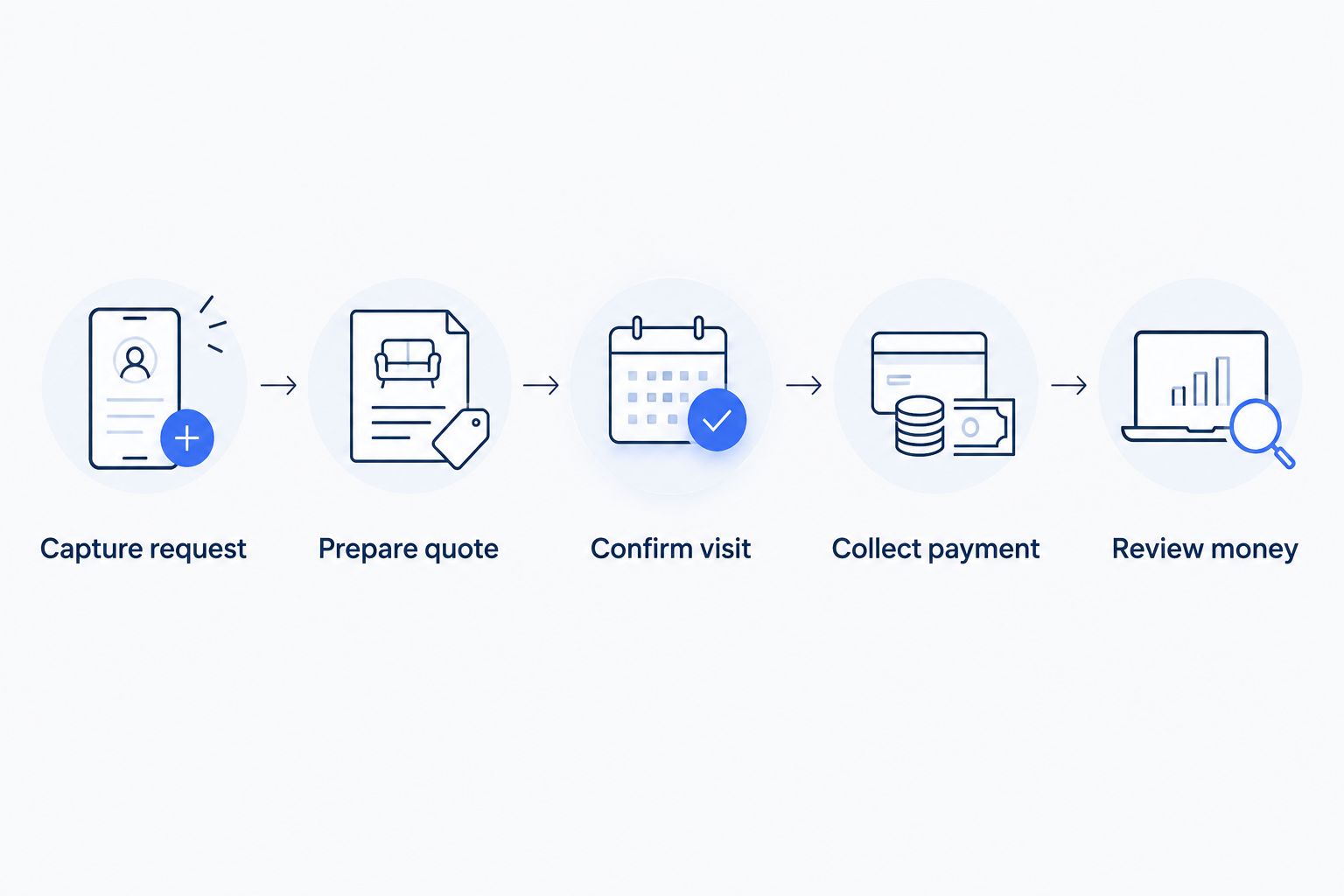
Evaluate the entire job workflow, not just the appointment calendar.
Reserve 30 minutes for this walkthrough, then identify 3 tasks that still require work outside the product. These are evaluation instructions, not performance benchmarks. Compare whether those remaining tasks are acceptable for your business.
How the options are ranked
This 2026 ranking prioritizes practical coverage for owner-operated handyman work, then separates options by their strongest relevant purpose. Solo Pro leads for assistant-supported administration; the other choices address job structure, dispatching, accounting, or a manual starting process.
The criteria are customer context, quotes, appointments, invoicing, money visibility, and team coordination. This is a capability-based guide, not a claim of timed product testing. Your required workflow should decide the final choice.
Which handyman business software should you choose?
Choose the assistant-supported option when you want help doing the administrative work and understanding what to do next. Choose Jobber when job organization leads the decision, or Housecall Pro when dispatching is essential today.
Choose QuickBooks Online for an accounting-first requirement. Keep Google Calendar with a spreadsheet only when you deliberately accept manual maintenance. For 2026, make current capabilities the deciding factor; do not buy around promised development.
FAQ
What's the best handyman business software for an owner-operated business?
Solo Pro is the best fit in this guide for an owner who wants a personalized assistant handling practical business tasks. It supports contacts, quotes, booking, reminders, invoicing, payment collection, and automatic income and expense classification.
Is Jobber better than Housecall Pro for a handyman business?
Choose Jobber for a job-management-led evaluation and Housecall Pro for a dispatch-led evaluation. Both belong on a field-service shortlist; compare your actual scheduling, quoting, and billing process before deciding.
Can QuickBooks Online manage my handyman appointments?
QuickBooks Online is an accounting choice, not a dedicated handyman scheduling and dispatch system. Evaluate a separate appointment workflow if booking and coordinating visits are central requirements.
Can I run my handyman schedule with Google Calendar and a spreadsheet?
Yes, Google Calendar and a spreadsheet can support a manual appointment and job-record process. You remain responsible for keeping records consistent and arranging quoting, invoicing, and payment collection.
What should handyman software include besides scheduling?
Handyman software should address the customer record, job scope, quoting, reminders, invoicing, and payment collection you need. Evaluate money tracking and staff coordination separately rather than assuming they come with a calendar.
What should I test before choosing handyman business software?
Test a representative job from the initial request through payment and financial review. Include a scope change and an appointment change so you can see which updates require manual work.
One last thing
Test a changed job, not just a new job. Add an extra repair after preparing the quote, then move the appointment. Those changes reveal whether scope, scheduling, and billing stay understandable—the distinction a tidy first-time booking demonstration can hide.
Related guides
Best lawn care software compares another service-business workflow built around customer visits.
Best invoicing software for house cleaners provides a billing-focused comparison for service work.
Best appointment scheduling software for booth renters provides a scheduling-focused comparison.