Best client management software for tutors in 2026

Best client management software for tutors in 2026
Best overall for owner-operated tutoring businesses: Solo Pro. Best for student records: TutorBird. Best for coordinating a tutoring agency: TutorCruncher. Best for financial and tax administration: QuickBooks Solopreneur. This 2026 tutoring business software guide compares the work each option handles, so you can choose around your clients, lessons and business needs.
TL;DR
- Solo Pro is the best tutoring business software here for owner-operated booking, reminders, payments and business money tracking.
- TutorBird suits tutors who want student records, lesson notes and attendance alongside scheduling and billing.
- TutorCruncher suits tutoring agencies coordinating tutors, client bookings, billing and tutor payments.
- QuickBooks Solopreneur suits financial and tax administration; choose your customer-booking workflow separately.
Why this matters
Tutoring creates two kinds of administration: managing the student’s learning and running the business around that learning. Those jobs overlap, but they are not interchangeable.
A lesson note helps you plan the next session. A reminder helps the client remember it. An invoice requests payment, while income and expense tracking helps you understand the business behind those payments.
Choose tutoring business software around the work you need it to do in 2026. If your biggest problem is unanswered scheduling messages, a detailed student database does not solve it by itself. If you coordinate several tutors, a convenient booking page does not replace tutor assignments.
What makes the best tutoring business software?
Customer relationships. You need to distinguish the person receiving tuition from the person arranging or paying for it. Look at how the software represents students, parents and other contacts before importing your existing records.
Booking and reminders. Booking should turn an agreed service into an appointment without another long message thread. Reminders should support that appointment rather than leave you composing each follow-up yourself.
Quotes, invoices and payments. A prospective client asking about tutoring needs a clear offer. After the work, you need a clear payment request and a way to collect it; these are different stages of the same customer relationship.
Business money visibility. Collecting payment and understanding your finances are separate tasks. Decide whether you need transaction tracking, financial reports, tax-related tools or a combination, rather than treating every money feature as equivalent.
Teaching administration. Attendance and lesson notes matter when you need a structured student history. They deserve their own evaluation, separate from general contacts and appointment management.
Team coordination. Managing your own appointments differs from assigning tutors to clients. If people need separate access or you allocate work across a team, make those requirements part of the decision from the start.
Tutoring business software at a glance
Solo Pro — Best for owner-operated customer and business workflows. Its personalized assistant helps with contacts, appointment reminders, quotes, booking-page wording and practical business questions. Booking, invoicing, payment collection and bank-connected income and expense tracking are current capabilities; multiple seats and dispatching remain in development.
TutorBird — Best for student records and lesson administration. Its tutoring-focused features include student management, scheduling, attendance, lesson notes and billing. The trade-off is fit: choose it because you need those teaching records, not simply because your business happens to offer tutoring.
TutorCruncher — Best for coordinating a tutoring agency. Its tutoring-agency workflow covers tutor management, scheduling, client billing and tutor payments. That broader coordination brings more setup decisions than an individual tutor needs for straightforward customer appointments.
QuickBooks Solopreneur — Best for financial and tax administration. Its financial workflow includes invoicing, payments, receipts, mileage, reports and tax-related tools. Compare its tiers carefully, and treat customer booking and lesson administration as separate selection requirements.
1. Solo Pro: best for running an owner-operated tutoring business
Solo Pro is a personalized AI assistant for service businesses, including tutors who manage their own customer relationships. Sherpa AI helps with concrete work: importing contacts from a phone, sending appointment reminders, quoting jobs and drafting customer-facing booking-page wording.
You can also connect bank accounts to automatically track and classify income and expenses. Ask about business health and get suggested next steps for generating income or reducing expenses; this is business money tracking, not a promise to replace full accounting or tax-filing software.
Strengths for tutors
Contacts without starting from scratch. Phone-contact importing helps you bring existing relationships into your business workflow. You do not need to treat every current client as a new lead.
Customer work in one place. Booking, quotes, invoicing and payment collection address the administrative stages around a tutoring session. Appointment reminders handle another task you would otherwise need to remember.
Help with customer-facing language. Sherpa can draft booking-page wording. That is useful when you know what you teach but need help explaining the service clearly to prospective clients.
Money visibility with next steps. Bank-connected tracking and classification give you a way to discuss income and expenses with the assistant. Keep the distinction clear: a suggested business action is not a guaranteed financial result.
Limitations and verdict
Team access is still in development. Multiple seats and dispatching are not available today. If your immediate requirement is separate staff access or allocating work across tutors, that affects this choice.
Money tracking is not tax filing. Keep your accounting and tax requirements separate from the assistant’s income and expense workflow.
Best for: Tutors who want help running customer relationships and the business around their lessons.
Verdict: Buy for owner-operated booking, reminders, quotes and money visibility.
2. TutorBird: best for student records and lesson administration
TutorBird organizes tutoring administration around students and lessons. Scheduling, attendance, lesson notes and billing make it relevant when your main problem is keeping the teaching relationship organized.
The distinction is the student record. If you regularly need to look back at attendance or previous lesson notes, evaluate that workflow before choosing a general-purpose business app.
Strengths for tutors
Student-centered organization. Student management gives the software a teaching-specific focus. That helps you evaluate it around the people receiving tuition rather than only the people paying invoices.
Attendance records. Attendance belongs with the lesson history. It gives you a structured record instead of leaving session status scattered across messages.
Lesson notes. Notes support continuity between sessions. They are particularly relevant when you need to prepare by reviewing what happened previously.
Scheduling and billing. These features connect lesson administration with the practical work of arranging sessions and requesting payment.
Trade-offs and verdict
More records mean more upkeep. Attendance and lesson notes are useful when you maintain them. If you will not use those records, they should not decide your purchase.
A student system is not automatically the whole business system. Evaluate your financial administration separately from lesson billing. Sending an invoice and organizing business expenses are different jobs.
Best for: Tutors who need a structured history of students, attendance and lessons.
Verdict: Buy when student records are the priority. Skip as the default if your actual problem is customer follow-up rather than teaching administration.
3. TutorCruncher: best for coordinating a tutoring agency
TutorCruncher focuses on managing a tutoring operation involving tutors and clients. Its workflow includes tutor management, scheduling, client billing and tutor payments.
That makes the central decision different from choosing an appointment tool for yourself. You are organizing who teaches the lesson, who pays the business and how the tutor gets paid.
Strengths for tutoring agencies
Tutor management. Tutor records and coordination matter when the business delivers lessons through multiple people. Evaluate this around your actual assignment process.
Scheduling across the operation. Agency scheduling needs to account for tutors as well as clients. A tool built around that relationship belongs on the shortlist when matching people to lessons is routine work.
Client billing. Billing is part of the agency workflow rather than an unrelated administrative task. That matters when the business, not the individual tutor, manages the client relationship.
Tutor payments. Paying tutors is a separate responsibility from collecting client payments. TutorCruncher addresses that agency-side requirement.
Trade-offs and verdict
Agency setup adds decisions. Tutor records, assignments, client billing and tutor payments need a consistent operating process. The software does not decide that process for you.
An individual tutor needs less coordination. If you teach every session yourself, tutor-management features are not the strongest reason to choose software. Start with the tasks you perform now.
Best for: Tutoring agencies that coordinate tutors and manage both client billing and tutor payments.
Verdict: Buy for agency coordination. Skip as the default for a straightforward individual tutoring workflow.
4. QuickBooks Solopreneur: best for financial and tax administration
QuickBooks Solopreneur addresses the financial side of self-employment. Its features include invoicing, payments, receipts, mileage, reports and tax-related tools; it is not merely an income-and-expense tracker.
Intuit’s official Solopreneur page, checked October 1, 2026, distinguishes Free and Lite capabilities. The Free tier includes one bank account and two invoices per month, with unlimited invoices when qualified for and enabling QuickBooks Payments; those limits do not describe the entire product.
Strengths for tutors
Financial administration. Receipts, reports and tax-related tools matter when organizing your finances is the main task. Evaluate them against your bookkeeping process.
Invoicing and payments. QuickBooks Solopreneur also handles customer billing work. Do not dismiss it as software that only categorizes transactions.
Mileage tracking. Mileage is relevant when you travel to deliver tutoring. It is a distinct requirement from appointment scheduling or student records.
Different tiers for different needs. The Lite tier includes unlimited invoices, receipts and mileage. Compare the tier you would actually use rather than applying Free-tier restrictions to every option.
Trade-offs and verdict
Billing does not settle the booking decision. An invoice feature answers how you request payment. You still need to decide how clients arrange lessons and receive appointment reminders.
Financial records and student records serve different purposes. Tax-related tools do not answer how you will maintain attendance or lesson notes.
Best for: Tutors whose main software requirement is financial and tax administration.
Verdict: Buy for the financial workflow. Hold if you are choosing primarily to solve lesson booking or student administration.
Choose around a real tutoring session
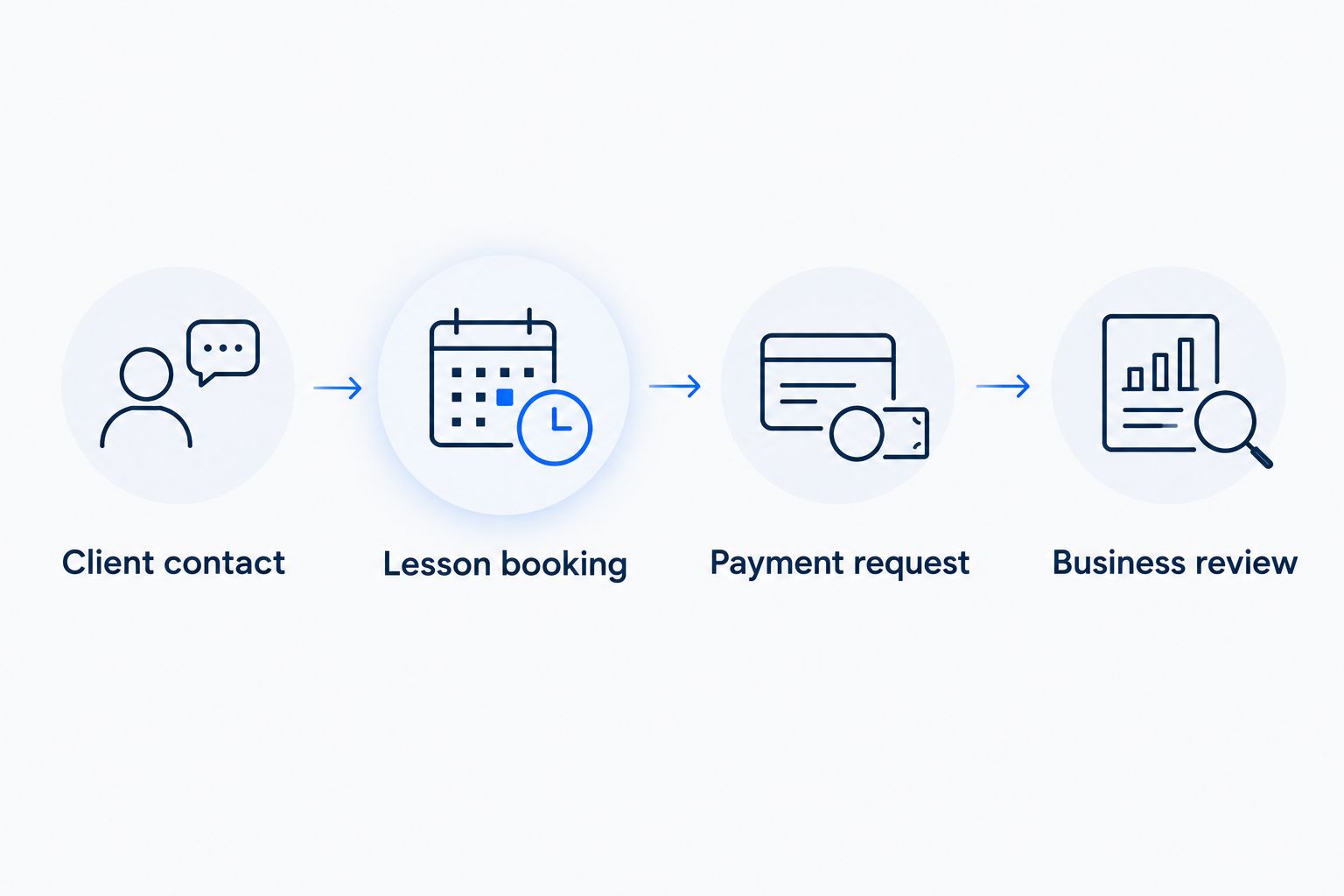
For your 2026 shortlist, walk through one ordinary client relationship rather than a feature catalog. Use the same example with every option so the comparison stays practical.
Client contact. Start with an existing contact and identify who needs appointment information. For a child receiving tuition, consider how you will distinguish the student from the parent or guardian.
Lesson booking. Arrange a 60-minute lesson. Notice which information the client supplies, which information you enter and where the appointment becomes visible.
Payment request. Move from the agreed service to an invoice and payment collection. Check that the workflow matches how you actually charge for tutoring, without assuming every tool handles every arrangement.
Business review. Look at what happens after payment. Decide whether you need a lesson record, business money tracking, financial reporting or each of those in a separate workflow.
Suppose your 60-minute lesson requires another 15 minutes of administration. That illustrative session occupies 75 minutes of working time; four such sessions include 60 minutes of administration beyond the teaching itself.
Those figures are a planning example, not measured customer results or a savings promise. Use your own timings to find the task software should handle first.
How these options are ranked
This 2026 ranking separates customer workflow, student administration, agency coordination and financial administration. There is no single winner across all four jobs.
Solo Pro takes the first position for owner-operated customer and business work because its current capabilities connect contacts, booking, reminders, quotes, payments and business money visibility. TutorBird, TutorCruncher and QuickBooks Solopreneur each receive a different recommendation tied to their respective workflows.
The deciding criterion is fit, not the longest feature list. A tool earns its place when its main workflow matches the administrative problem you need to solve.
Which tutoring business software should you choose?
Choose Solo Pro if your 2026 priority is running the business around your tutoring: bringing in contacts, arranging bookings, reminding clients, quoting work, collecting payments and understanding business money.
Choose TutorBird when student records and lesson administration matter most. Choose TutorCruncher when assigning tutors and managing agency billing are central. Choose QuickBooks Solopreneur when financial and tax administration drives the decision.
Do not choose around a future business structure while leaving today’s work unresolved. Equally, do not ignore an immediate team-access requirement just because an individual workflow looks convenient.
FAQ
What is the best tutoring business software for an independent tutor?
The best choice depends on the work you need to organize: customer bookings and payments, student records or financial administration. Choose around your recurring administrative problem rather than the largest feature list.
Is TutorBird better than TutorCruncher for tutoring?
TutorBird is the stronger fit for student records and lesson administration; TutorCruncher is the stronger fit for tutoring-agency coordination. Decide whether your main job is managing your own students or coordinating tutors, clients and tutor payments.
Can I use QuickBooks Solopreneur for a tutoring business?
Yes, QuickBooks Solopreneur is an option for the financial administration of self-employment, including invoicing, payments and tax-related tools. Evaluate lesson booking, appointment reminders and student records separately from that financial workflow.
Do tutors need a CRM or dedicated tutoring software?
Tutors need dedicated tutoring software when student records, attendance and lesson notes are central requirements. A customer-management workflow fits a different need: organizing contacts, bookings, reminders, quotes and payments.
What should I check if parents pay for their children's tutoring?
Check how the software distinguishes the student from the parent or guardian arranging and paying for lessons. Use a realistic booking example to review contact details, appointment information and billing before moving your records.
Does collecting payments replace accounting software?
No, collecting payments does not replace accounting or tax administration. Payment collection, business money tracking, financial reporting and tax filing are separate jobs, even when some appear in the same product.
How should I compare tutoring software in 2026?
Compare each option using the same client contact, lesson booking, payment request and business review. Add student records or tutor assignments when those tasks are part of your actual workflow.
One last thing
Your client is not always your student. Before moving your tutoring business into new software in 2026, decide whose details belong on the appointment, who receives the reminder and who receives the invoice.
That simple distinction gives your evaluation a concrete test. A polished booking experience is not enough if your day-to-day process still leaves you sorting out which person needs which message.
Related guides
Best all-in-one software for solo consultants