Booking software for content creators: Best picks 2026

Booking software for content creators: Best picks 2026
Best overall for creators selling services: Solo Pro. Best for booking calls: Calendly. Best for appointment-based sessions: Acuity Scheduling. Best for managing client projects: HoneyBook. The best booking software for content creators in 2026 depends on what happens after someone reserves your time: a conversation, a paid session, or a project that needs a quote and an invoice.
TL;DR
- Solo Pro is the best booking software for content creators who want service bookings, job quotes, and money tracking together.
- Calendly is best for scheduling calls when project work and invoicing happen elsewhere.
- Acuity Scheduling is best for appointment-based sessions that need intake forms and payment collection.
- HoneyBook is best for client projects that need proposals, contracts, invoices, and scheduling.
Why this matters
A creator who sells sponsorships does not have the same booking problem as a photographer selling shoots or a consultant selling advice. A meeting link can handle the first conversation. It does not necessarily handle the work that follows.
For your 2026 decision, start with the transaction rather than your job title. If clients book your time directly, appointment controls matter. If a booking starts a larger assignment, quoting, client records, and invoicing deserve equal attention.
Choose software for the work surrounding the appointment, not just the calendar slot. That distinction separates a convenient meeting scheduler from a system that supports your service business.
What makes the best booking software for content creators
Booking fit. Match the booking process to what you sell. A discovery call, a coaching session, and a production project need different questions and different commitments from the client.
Client preparation. Decide what you need before the appointment. A session might require a topic and an objective; a shoot might require a location, a brief, and a discussion before you can quote it.
Payment workflow. Identify whether clients pay for the appointment itself or receive an invoice for a larger job. Do not treat appointment payment collection and project invoicing as interchangeable.
Reminders. Look for appointment reminders if you currently send those messages yourself. Separate reminders from preparation instructions: clients still need to know what to bring or decide before the session.
Work after booking. Check whether you need quotes, invoices, contracts, or income and expense tracking. A dedicated scheduler is a sensible choice when those jobs already have a home elsewhere.
Current team requirements. Test the workflow you actually need in 2026. If assigning work to colleagues is essential, verify present-day access and assignment capabilities rather than treating a development plan as an available feature.
Booking software at a glance
Solo Pro — Best for service-business work around bookings. The personalized AI assistant combines booking, appointment reminders, quoting, invoicing, payment collection, and bank-connected income and expense tracking.
Calendly — Best for calls and meeting coordination. Its central job is letting people choose meeting times against your connected calendar availability. It is not a substitute for the project-management, quoting, and bookkeeping processes you need after the meeting.
Acuity Scheduling — Best for appointment-based creator services. Appointment types, intake forms, and payment collection suit businesses that sell bookable sessions. Its appointment-centered workflow does not replace managing a larger creative assignment with deliverables and approvals.
HoneyBook — Best for client-project administration. Scheduling sits alongside proposals, contracts, and invoices, making it relevant when a call begins a client engagement. You need to configure the project workflow; a simple meeting link does not require that same setup.
1. Solo Pro: best for creators running a service business
A creator selling editing, photography, consulting, or other client services has work beyond choosing a meeting time. This personalized AI assistant helps import contacts from a phone, send appointment reminders, quote jobs, and draft customer-facing booking-page wording. Booking, invoicing, and payment collection are current capabilities.
You can also connect bank accounts to automatically track and classify income and expenses. The assistant answers questions about business health and suggests next steps for generating income or reducing expenses. That makes the recommendation about running a service business, not simply arranging calls.
Pros: contacts. Importing contacts from your phone gives you a starting point for client administration without manually re-entering those contacts.
Pros: booking support. Booking and appointment reminders address the appointment itself, while help drafting booking-page language addresses what clients read before reserving time.
Pros: job administration. Quoting, invoicing, and payment collection support services that require more than an introductory conversation.
Pros: money visibility. Bank-connected income and expense tracking adds financial context beyond the booking calendar. You can ask about business health and practical next steps.
Cons: team operations. Multiple seats and dispatching are in development.
Best for: Creators who sell services and want an assistant to help with bookings, client administration, and money tracking.
Verdict: Buy for service-business administration; skip if your essential requirement is live multi-seat access or dispatching.
2. Calendly: best for discovery calls and collaborations
Calendly focuses on scheduling meetings. You share an event link, and the other person chooses a time based on the availability you have configured and your connected calendar.
That fits a creator arranging brand introductions, podcast conversations, collaboration discussions, or initial client calls. The booking is the conversation, not necessarily the purchase of a finished service.
Calendly pros: meeting focus. A dedicated scheduling workflow keeps the booking decision centered on the event and the time. You do not need to build a full client-project process just to arrange a conversation.
Calendly pros: availability. Connected calendar availability helps avoid offering meeting slots that conflict with existing events. Your scheduling rules still need to reflect how you work.
Calendly pros: event types. Separate event types let you distinguish different kinds of conversations rather than asking everyone to book the same generic appointment.
Calendly cons: business administration. A scheduling link does not replace quoting a production job, tracking its expenses, or managing its deliverables. Those processes need their own home.
Calendly cons: qualification. Easier booking is not the same as better qualification. If you only want relevant collaboration calls, your booking questions and page wording must make the purpose clear.
Best for: Creators whose main problem is coordinating calls while keeping project work and financial administration elsewhere.
Verdict: Buy for meeting coordination; skip as your sole system for a service business.
3. Acuity Scheduling: best for paid appointment-based sessions
Acuity Scheduling organizes bookable appointments using appointment types, availability, intake forms, and payment collection. It suits a creator who sells a session with a defined purpose, such as coaching, portfolio feedback, or a consultation.
The distinction is that the appointment is the service. Clients choose the session you have defined instead of opening a conversation about an undefined project.
Acuity Scheduling pros: appointment types. Different appointment types help you explain separate services. A portfolio review should not look identical to an introductory consultation if the preparation and outcome differ.
Acuity Scheduling pros: intake. Intake forms let you ask for information before the session. Use them for details that genuinely change how you prepare, rather than collecting background you will never read.
Acuity Scheduling pros: payment collection. Appointment payment collection supports a session-based business model. Check the current setup requirements against the way you intend to sell your sessions.
Acuity Scheduling cons: project fit. An appointment-centered system is not a replacement for managing a creative project with stages, deliverables, and approvals. A booked consultation and a completed assignment remain different things.
Acuity Scheduling cons: configuration. Appointment choices, intake questions, and availability rules need deliberate setup. Poorly defined services make the booking experience confusing even when the software works correctly.
Best for: Creators who sell defined appointments rather than open-ended assignments.
Verdict: Buy for session-based services; skip as a substitute for a project workflow.
4. HoneyBook: best for bookings that begin client projects
HoneyBook combines scheduling with client-project tools, including proposals, contracts, and invoices. It fits a creator whose discovery call is the beginning of a paid engagement rather than the entire service.
Think about the work between the first conversation and the final invoice. If you need to formalize scope and keep client documents together, that workflow matters more than having the simplest possible appointment page.
HoneyBook pros: project context. Scheduling belongs alongside the client engagement rather than standing apart from it. That is useful when the call leads to further administrative steps.
HoneyBook pros: client documents. Proposals and contracts support the process of defining an assignment. They address a different need from simply letting someone select an available time.
HoneyBook pros: invoicing. Invoicing supports project-based services where the financial transaction is tied to the assignment, not just the appointment.
HoneyBook cons: setup. You need to define the documents and project process you want to use. Adding software does not decide your scope, revision boundaries, or client responsibilities for you.
HoneyBook cons: unnecessary scope. If you only arrange occasional conversations, project administration adds work you do not need. A dedicated scheduler is a more direct answer to that narrower problem.
Best for: Creators managing client assignments that require proposals, contracts, and invoices after the first booking.
Verdict: Buy for client-project administration; skip when a meeting link solves the whole problem.
Match the software to your actual booking
Before choosing, describe a real transaction from your business. Use the following sequence to separate essential requirements from attractive features you will not use.
Define the session. Write down what the client is booking. For example, a 30-minute portfolio review is a defined service; a conversation about a video production assignment is a qualification step.
Collect the brief. Identify the information you need beforehand. A 15-minute introductory call needs different preparation from a 60-minute consultation where you review the client's work. These are example formats, not recommended duration limits.
Confirm the booking. Decide what the client must understand before attending: the purpose, preparation, location or meeting arrangement, and what happens if the scope changes. Use your actual business terms rather than copying another creator's wording.
Handle the money. Decide whether the transaction belongs to the session or a larger job. That tells you whether appointment payment collection, quoting, or project invoicing should drive your choice.
Review the work. After the appointment, identify what remains. If your next step is an assignment, choose around that assignment too; if the service ends with the session, do not add project administration without a reason.
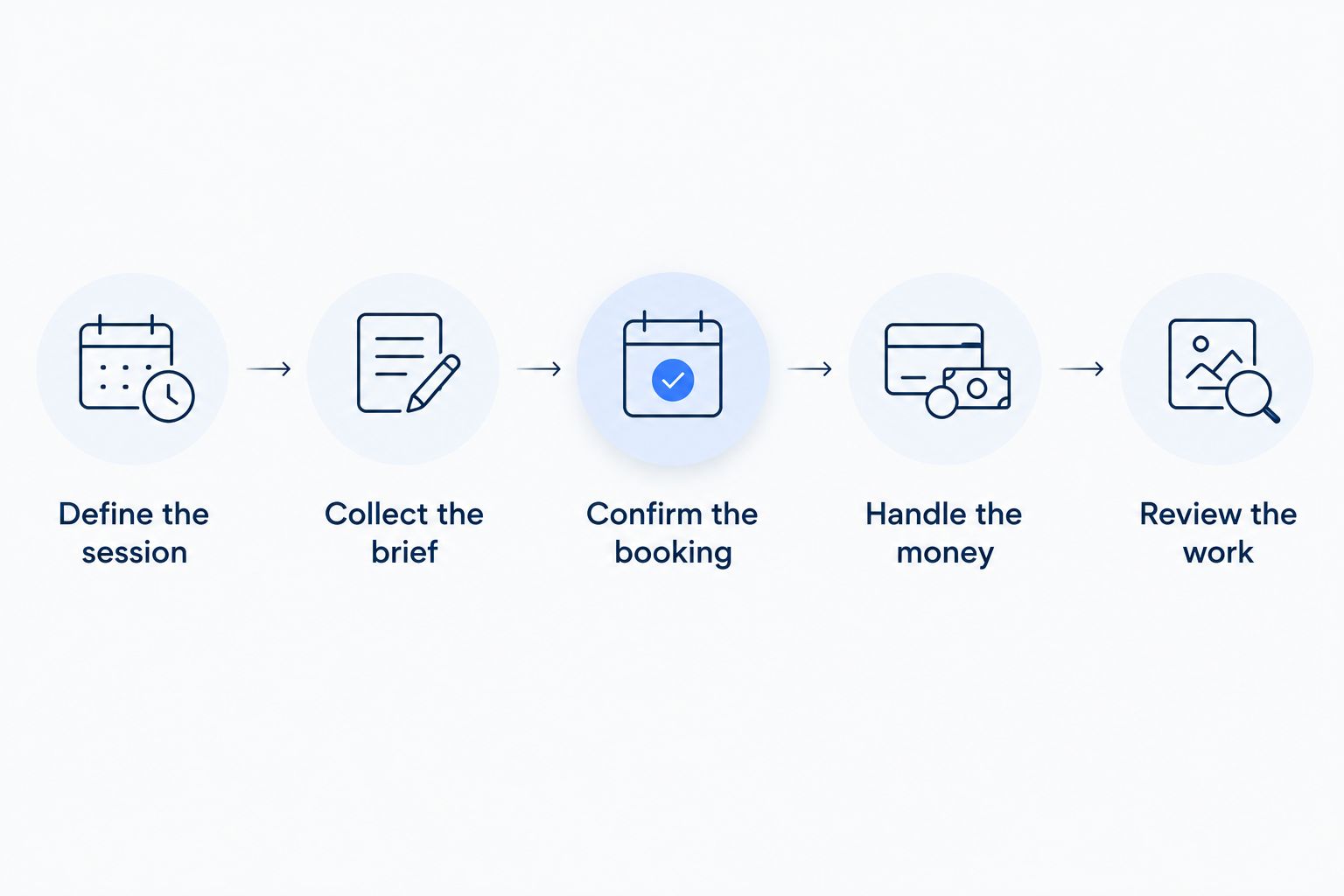
The work before and after the appointment determines which booking tool fits.
How these options are ranked
The 2026 ranking follows the criteria above: booking fit, client preparation, payment workflow, reminders, work after booking, and current team requirements. Each option owns a different use case rather than competing for an undefined claim of being best at everything.
This is a workflow comparison, not a scored performance test. The first recommendation fits creators operating a service business; the remaining recommendations narrow the decision to meetings, appointments, or client projects.
Which booking software should you choose?
Choose Solo Pro for booking software that also helps run your service business. Its personalized assistant handles relevant work around the appointment, including contacts, reminders, quotes, invoices, and income and expense tracking.
Choose Calendly when you need to arrange calls and your other systems already handle the business. Choose Acuity Scheduling when clients purchase defined appointments. Choose HoneyBook when a booking begins a project requiring client documents and invoices.
For an undecided reader in 2026, the deciding question is simple: does your administrative work end when the meeting is booked? If not, evaluate the next task before committing to a scheduler.
FAQ
What's the best booking software for content creators in 2026?
Solo Pro is best for creators selling services who want booking alongside quotes, invoicing, and income and expense tracking. Calendly fits calls, Acuity Scheduling fits defined appointments, and HoneyBook fits client-project administration.
Is Calendly enough for a content creator?
Calendly is enough when your primary requirement is arranging meetings and your other systems handle client work. It does not replace the quoting, project administration, and money-tracking processes surrounding a service business.
What's the best option for booking paid consultations?
Acuity Scheduling is a strong fit for defined consultations because it combines appointment types, intake forms, and payment collection. Choose around the information you need before the session and how the session is sold.
Is HoneyBook better than a simple meeting scheduler?
HoneyBook fits better when a meeting starts a client project requiring proposals, contracts, and invoices. A dedicated meeting scheduler fits better when arranging the conversation is the entire requirement.
Can booking software manage content publishing too?
Do not assume booking software manages content publishing. Scheduling client appointments and scheduling published content are separate requirements; evaluate your publishing workflow independently.
What should I ask clients before they book?
Ask for information that changes your preparation or determines whether the service fits. Depending on the appointment, that includes the objective, the work to review, or the scope that needs discussion.
What if I need multiple people to manage bookings?
Verify current multi-user access and assignment capabilities before choosing a product. Treat capabilities described as in development as unavailable for your present-day workflow.
One last thing
Test your booking page from the client's side before sharing it. Read the service description, answer the intake questions, and inspect what the confirmation tells you to do next.
A calendar slot tells a client when to attend. It does not, by itself, tell them what they bought or how to prepare. Clear booking-page wording is part of the service, not a finishing touch.
Related guides
Best all-in-one software for solo consultants covers a closely related decision for creators selling expertise.
Best Jobber alternatives for solo businesses provides another comparison angle for service-business software.
Best appointment scheduling software for booth renters focuses on another appointment-based service workflow.