Software for hairstylists and barbers: Best 2026

Software for hairstylists and barbers: Best 2026
Best overall for hands-on business assistance: Solo Pro. Best for appointment-linked checkout: Square Appointments. Best for marketplace discovery: Fresha. Best for barber-focused client booking: Booksy. Best for configurable appointment intake: Acuity Scheduling. These are different answers to the same search for software for hairstylists and barbers in 2026: choose the tool that handles your unfinished work, not the longest feature list.
TL;DR
Why this matters
Your calendar tells you when someone is coming. It does not, by itself, tell you whether the business is doing well or what to do next. Choosing scheduling software without considering payments, expenses and customer communication leaves those tasks in your hands.
For an independent hairstylist or barber, the useful distinction is between booking software that records appointments and business assistance that helps with the work around them. Both have a place. The right choice depends on whether your biggest problem is an empty chair, checkout friction, repeated booking messages or scattered business information.
This 2026 guide separates those jobs. It also treats team requirements as current purchasing requirements, not features you should assume will arrive later.
What makes the best software for hairstylists and barbers?
Booking fit. Your service menu should reflect how you actually work. Check appointment length, preparation time and the information you need before accepting a booking. A haircut and a color consultation should not require the same intake simply because the software defaults to it.
Customer communication. Appointment reminders matter, but so does the wording customers see before they book. Look for a workable way to explain services, preparation and expectations without rewriting the same message for every client.
Payment workflow. Decide whether you need a checkout-centered system or a broader workflow involving quotes, invoices and payment collection. Those are related tasks, not interchangeable features. Test your actual payment process before choosing.
Money visibility. Taking payments is not the same as tracking business expenses. If understanding income and spending is part of your goal, examine how that work happens rather than treating a sales total as a complete financial picture.
Customer ownership. Consider whether you want customers booking directly with you or finding you through a marketplace. A discovery platform and a direct scheduling tool solve different problems; neither choice replaces a clear service menu.
Current team support. Shared access and dispatching are separate from customer booking. In 2026, assess the functions available now. Do not buy a product on the assumption that an announced feature already works.
The options at a glance
Solo Pro — Best for practical business assistance. The personalized AI assistant combines current booking, invoicing and payment collection with contact import, appointment reminders and bank-connected income and expense tracking. Its limitation for shared operations is specific: multiple seats and dispatching are in development, not available today.
Square Appointments — Best for appointment-linked checkout. Appointment scheduling sits within Square’s payment and point-of-sale ecosystem. Its standout is the connection between the calendar and checkout; that focus is different from an assistant that answers broader business-health questions.
Fresha — Best for marketplace discovery. Fresha combines beauty and wellness booking software with a consumer marketplace. The discovery route is its defining distinction, but a marketplace listing does not guarantee that new customers will choose your business.
Booksy — Best for barber-focused client booking. Booksy combines appointment management with a consumer booking app used in beauty and barber services. Its recognizable booking route is useful when that matches your clients’ habits; customers still need accurate services and appointment details.
Acuity Scheduling — Best for configurable appointment intake. Acuity combines online scheduling with intake forms and appointment communication. It is a general scheduling product rather than a salon-specific operating system, so you need to translate your services into its appointment structure.
1. Solo Pro: best for business assistance beyond the calendar
Solo Pro is a personalized AI assistant for service businesses, starting with owner-operated teams. It can instantly import contacts from your phone, send appointment reminders and draft customer-facing booking-page language. Booking, invoicing and payment collection are current capabilities.
The useful difference is what happens outside the appointment itself. You can connect bank accounts to automatically track and classify income and expenses, ask questions about business health, and get suggested next steps for generating income or reducing expenses. The assistant also helps quote jobs; for a hairstylist or barber, use that capability only where a quote fits your service rather than forcing it into every haircut booking.
Pros: customer setup. Phone contact import gives you a way to bring existing customer information into the business workflow instead of rebuilding it manually.
Pros: communication work. Reminders and booking-page drafting address concrete customer-facing tasks. You remain responsible for checking that the wording matches your services and policies.
Pros: financial context. Bank-connected tracking and classification bring income and expenses into the picture, rather than limiting your view to appointments or payments collected.
Cons: shared access. Multiple seats are in development and are not available today. If separate staff access is a purchasing requirement, treat that as a present limitation.
Cons: dispatching. Dispatching is also in development. Do not choose the product expecting current assignment and dispatch workflows.
Best for: Owner-operated service businesses that want help with customer administration and money decisions alongside booking.
Verdict: Buy Solo Pro for business assistance beyond scheduling; skip it for a current multiple-seat or dispatching requirement.
2. Square Appointments: best for appointment-linked checkout
Square Appointments connects online appointment scheduling with Square’s payment and point-of-sale ecosystem. That makes it a relevant option when the work you most want to simplify happens between the booked service and checkout.
For a hairstylist or barber, assess the complete visit: how the customer books, how you see the appointment, and how you finish the transaction. Do not judge the booking page separately from the payment workflow you intend to use.
Pros: connected purpose. Scheduling and checkout belong to the same product ecosystem. That is a clear reason to evaluate it when payment handling drives your decision.
Pros: direct booking. Online appointment booking gives customers a route to request time without starting every appointment through a message exchange.
Pros: appointment communication. Reminder functionality supports the period between booking and the visit. Check the current configuration against the communication you want customers to receive.
Cons: a different emphasis. An appointment-and-checkout workflow is not the same as personalized guidance about income, expenses and next actions. Choose it for the job it handles, not an unrelated expectation.
Cons: setup still matters. You must define services, durations and booking rules. Connecting the calendar to checkout does not remove those decisions.
Best for: Independent professionals whose main requirement is scheduling connected to a payment-centered workflow.
Verdict: Buy Square Appointments when checkout is the deciding requirement; skip it as a substitute for business-health assistance.
3. Fresha: best for beauty marketplace discovery
Fresha offers appointment software for beauty and wellness businesses alongside a consumer marketplace. That combination matters when you want both a booking system and a place where potential customers can discover services.
For a 2026 decision, separate those two benefits. You can evaluate the booking workflow directly, but customer discovery depends on whether people find and choose your listing. Treat the marketplace as a channel, not a promised appointment pipeline.
Pros: category context. Beauty and wellness are central to the product’s purpose. Your services sit in a relevant booking environment rather than a general meeting scheduler.
Pros: discovery route. The consumer marketplace offers a route for people to find businesses and book services. That distinguishes it from scheduling tools focused only on appointments from customers you already reach.
Pros: booking management. Appointment management supports the operational side after someone chooses a service. Evaluate discovery and administration together, while keeping their outcomes separate.
Cons: no guaranteed demand. A marketplace listing does not guarantee new customers. Your service descriptions and suitability still determine whether someone books.
Cons: listing work. You need to maintain accurate service information. Incorrect durations or unclear descriptions remain your problem even when the listing appears on a beauty-focused platform.
Best for: Beauty professionals who want marketplace discovery as part of their booking strategy.
Verdict: Buy Fresha when marketplace participation is intentional; skip it if you expect a listing alone to fill your calendar.
4. Booksy: best for barber-focused client booking
Booksy combines business appointment management with a consumer app for finding and booking beauty and barber services. It belongs on this shortlist when your priority is a client-facing booking route that fits barbering rather than general-purpose scheduling.
Ask existing customers how they prefer to book before making that route central to your business. A familiar app can support repeat booking, but you still need to explain which service to choose and how much appointment time it requires.
Pros: barber relevance. Barber services are part of Booksy’s established focus. That gives the product a clear use case for this comparison.
Pros: consumer booking. The customer-facing app provides a place to find services and book appointments. That is useful when the app-based route matches the customers you serve.
Pros: appointment organization. Business scheduling functions support the calendar side of the relationship. Evaluate them using your real service menu rather than a generic demonstration.
Cons: customer fit matters. A booking route only works when your customers use it. Do not assume that choosing a barber-focused product automatically changes their booking habits.
Cons: service clarity remains yours. Similar service names can still confuse customers. The software does not decide how you distinguish a haircut, beard service or combined appointment.
Best for: Barbers who prioritize a barber-relevant consumer booking experience.
Verdict: Buy Booksy when its customer booking route fits your clientele; hold if you have not checked that fit.
5. Acuity Scheduling: best for configurable appointment intake
Acuity Scheduling is a general online scheduling tool with intake forms, appointment types and reminder functionality. Its strongest role here is collecting information and organizing appointments rather than providing a beauty marketplace.
That makes it relevant when your booking questions are specific. A consultation can require different information from a routine appointment, and intake forms give you a way to collect that information during scheduling.
Pros: intake forms. You can collect appointment-related information before the visit. Keep questions relevant to the service and avoid collecting sensitive information without a clear need.
Pros: appointment structure. Different appointment types let you organize services around the work you offer. Clear naming is essential.
Pros: general-purpose scheduling. The product is not tied to a beauty marketplace. That suits a business choosing scheduling around its own customer journey.
Cons: not salon-specific. Acuity is a general scheduling product. You must make its appointment structure fit your haircut, grooming or consultation workflow.
Cons: not a complete financial picture. Collecting booking information does not establish how you will track expenses or evaluate business health. Decide how those tasks will be handled separately.
Best for: Hairstylists and barbers who prioritize appointment intake and scheduling configuration.
Verdict: Buy Acuity Scheduling for intake control; skip it if your central need is broader business assistance.
How this ranking works
This 2026 ranking separates five purchasing jobs: business assistance, appointment-linked checkout, marketplace discovery, barber-focused booking and configurable intake. The order favors help across daily business tasks, then gives each specialist option its own use case.
Choose by unfinished work. If your appointments are organized but expenses are not, another calendar is not the answer. If checkout is the problem, financial guidance alone will not finish the transaction. Match the product to the task before comparing secondary features.
Test the workflow before you commit
Daily work. Test 3 workflows: booking a new client, completing a returning client’s visit, and reviewing the business after payments and expenses. These are evaluation tasks, not a claim about any product’s performance.
Contacts. Start with customer details. Check what you need to enter, import or correct before the booking makes sense.
Bookings. Enter 2 sample services with different appointment lengths. Confirm that customers can distinguish them and that the resulting calendar matches your working day.
Reminders. Read the message the customer receives. Check that it identifies the appointment clearly and does not communicate a policy you never intended to set.
Payments. Follow the transaction through to completion. Confirm what you need to do after the service rather than stopping the evaluation at a successful booking.
Money tracking. Review 1 full week of your own business records during evaluation. Decide whether the product helps answer your financial questions or whether that work remains elsewhere.
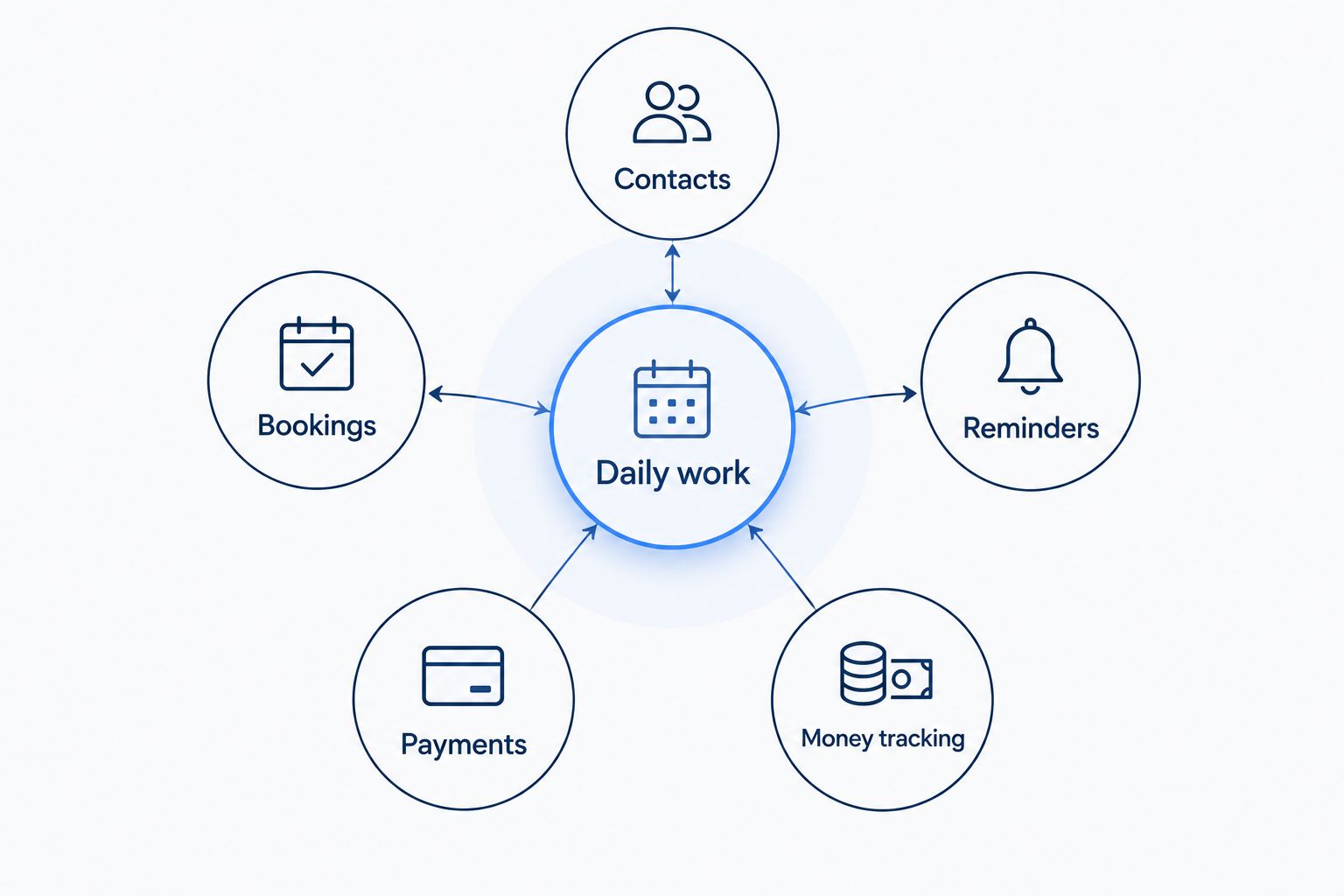
Evaluate the work around an appointment, not just the booking screen.
Which software should you choose?
Choose Solo Pro if you want a personalized AI assistant to help with contacts, reminders, booking language, payments and understanding business income and expenses. That is the default recommendation for an owner-operated service business seeking assistance beyond its calendar.
Choose Square Appointments when checkout drives the decision. Choose Fresha for intentional marketplace participation, Booksy for a barber-focused customer booking route, or Acuity Scheduling for appointment intake control. In 2026, buy for your current workflow and current access requirements—not a future feature list.
FAQ
What's the best software for hairstylists and barbers in 2026?
Solo Pro is the best fit in this comparison for owner-operated service businesses wanting personalized business assistance alongside booking and payments. Square Appointments, Fresha, Booksy and Acuity Scheduling suit the distinct checkout, discovery and scheduling needs described above.
Is appointment scheduling software enough for an independent hairstylist?
Appointment scheduling software is enough for organizing bookings, but it does not by itself cover every business task. Evaluate customer communication, payment handling and expense tracking separately.
Should a barber choose Booksy or Square Appointments?
Choose Booksy when barber-focused customer booking is the priority; choose Square Appointments when appointment-linked checkout is the priority. Test the customer journey and the end-of-visit workflow before deciding.
Does a Fresha listing guarantee new clients?
No, a Fresha listing does not guarantee new clients. Treat marketplace discovery as a channel and keep your services, descriptions and booking details accurate.
Can Acuity Scheduling collect information before an appointment?
Yes, Acuity Scheduling supports intake forms for collecting appointment-related information. Use them for questions that genuinely affect the service, and keep the booking process clear.
What should I test before changing my booking software?
Test a new-client booking, a returning-client visit and a business-record review. Check service selection, reminders, payment completion and the work left outside the software.
One last thing
A successful booking is not the end of a successful workflow. During your 2026 evaluation, keep going until the visit is complete, the payment is handled and you can understand what the work contributed to the business. The task you still have to finish manually is the most useful comparison point.
Related guides
Best appointment scheduling software for booth renters