Best photography business software in 2026

Best photography business software in 2026
Best overall for owner-operated service administration: Solo Pro. Best for proposals and contracts: HoneyBook. Best for customizable client workflows: Dubsado. Best for gallery delivery: Pixieset. The right photography business software in 2026 depends on whether you need help running the business, organizing client agreements, or delivering finished photographs.
TL;DR
- Solo Pro is the best photography business software here for assistant-led booking, invoicing, and business money tracking.
- HoneyBook suits photographers who organize client work around proposals, contracts, and payments.
- Dubsado suits photographers who want to configure forms and client workflows.
- Pixieset suits photographers whose main problem is client gallery delivery.
Why this matters
A photography business has two different kinds of work: producing photographs and running paid engagements. Editing a portrait does not send an appointment reminder. Delivering a gallery does not tell you what business expenses are doing to your income.
For your 2026 shortlist, identify the task that keeps slipping first. If clients wait for quotes, prioritize the quoting process. If completed shoots sit undelivered, prioritize galleries instead.
Do not choose business software because its example gallery looks good. Choose it because it handles the work you currently chase by hand. A photographer with an established delivery process needs a different purchase from someone still emailing download instructions after every shoot.
What makes the best photography business software in 2026
Booking and reminders. Look at how you arrange the appointment and communicate what happens next. A portrait session needs a clear time and location; a commercial inquiry needs a clear scope before it becomes a booking.
Quotes and client agreements. Separate describing the job from formalizing the agreement. A quote communicates proposed work, while a contract sets the terms. Decide which of those tasks is causing delays rather than treating them as interchangeable.
Invoicing and payment collection. You need a way to request payment that matches the work agreed with the client. Test how clearly the invoice describes the session, deliverables, and any separately agreed work.
Business money visibility. Collecting payment and understanding business finances are different jobs. Look for a process that helps you keep income and expenses organized without mistaking business money tracking for tax preparation.
Client delivery. A booking system and a photo gallery solve different problems. If clients need to view, select, or download images, assess that experience separately from appointment administration.
Setup and daily effort. Customization is useful when it reflects a process you actually follow. It becomes another project when you spend more time adjusting forms than answering inquiries. Your existing working habits belong in the decision.
The options at a glance
Solo Pro — Best for assistant-led business administration. Sherpa helps with contacts, job quotes, booking-page wording, reminders, and questions about business health. Booking, invoicing, payments, and bank-connected income and expense tracking are current capabilities. Multiple seats and dispatching are in development, not available today.
HoneyBook — Best for proposals and contracts. HoneyBook brings proposals, contracts, invoices, and client project administration into a service-business workflow. Its strength is organizing the engagement; selecting it does not replace your image-editing or gallery-delivery decisions.
Dubsado — Best for customizable client workflows. Dubsado combines client forms, contracts, invoicing, scheduling, and configurable workflows. Its flexibility comes with setup work: you need to decide what each process should do before configuring it.
Pixieset — Best for client gallery delivery. Pixieset combines photography-focused client galleries with business tools through Studio Manager. Its gallery strength does not remove the need to assess booking, agreements, and financial administration on their own merits.
1. Solo Pro: best photography business software for daily administration
Sherpa, the personalized AI assistant, helps you do the work around a photography job. You can import contacts from your phone, quote jobs, draft customer-facing booking-page language, and send appointment reminders. Booking, invoicing, and payment collection are also part of the current product.
You can connect bank accounts to automatically track and classify income and expenses. Sherpa also answers questions about business health and suggests practical next steps for generating income or reducing expenses. That connects the administrative side of a shoot with the money side of running your business.
Solo Pro pros. Phone contact importing gives you a starting point for organizing existing customer relationships rather than retyping every contact.
Assistant-led work. Help with quotes and booking-page wording addresses tasks you need to complete, not just fields you need to maintain.
Money tracking. Bank-connected income and expense classification gives business administration a financial component beyond issuing an invoice.
Solo Pro cons. Multiple seats and dispatching are still in development. Do not choose it on the assumption that those capabilities are live.
Financial boundary. Business money tracking is not a promise to replace full accounting or tax-filing software. Keep that distinction clear when planning your financial process.
Best for: Owner-operated photography businesses that want help managing customers, appointments, quotes, payments, and business money.
Verdict: Buy for assistant-led administration.
2. HoneyBook: best photography business software for client agreements
HoneyBook organizes client engagements around tools such as proposals, contracts, and invoices. It fits photographers who want to carry an inquiry through an agreed project and payment process. The central question is how you formalize the work, rather than how you edit the resulting photographs.
For a photographer whose jobs require written scope and signatures, that structure is relevant. Start by looking at the documents you already send: the proposal, agreement, and invoice should tell a consistent story about the job.
HoneyBook pros. Proposals and contracts support the transition from an interested prospect to an agreed engagement.
Payment administration. Invoicing and payment tools address the collection side of client work within the same service-business environment.
Project organization. A client-project approach gives you a place to organize the administrative work associated with an engagement.
HoneyBook cons. Document tools do not decide your licensing, cancellation, or usage terms. You still need agreements appropriate to your photography work.
Delivery boundary. Client project administration is not image editing. Assess your photo-production and delivery process separately rather than expecting contract software to handle everything.
Best for: Photographers who want proposals, signed agreements, and invoicing to form the backbone of their client process.
Verdict: Buy when the agreement-to-payment process is your main administrative problem.
3. Dubsado: best photography business software for custom workflows
Dubsado provides forms, contracts, invoices, scheduling, and configurable client workflows. Its appeal is the ability to shape a process around how your business handles inquiries and engagements. That makes it a different choice from selecting software primarily for an assistant or a gallery.
Customization needs a clear brief. Before configuring anything, write down which information you need from a prospect, which document you send next, and which event should move the engagement forward. Otherwise, you are designing the process while building it.
Dubsado pros. Client forms help structure the information you collect before deciding what work to quote.
Workflow configuration. Configurable workflows suit photographers who already know how they want different types of engagements to progress.
Connected administration. Contracts, scheduling, and invoices support several stages of the client relationship rather than only the final payment request.
Dubsado cons. Configuration creates setup work. A process that has not been clearly defined is harder to turn into useful automation.
Maintenance responsibility. When you change your booking process or client documents, review the associated workflow. Customization is a continuing responsibility, not just an initial advantage.
Best for: Photographers with repeatable client processes who want control over forms and workflow structure.
Verdict: Buy if customization solves a defined need; skip it if you do not want to maintain workflows.
4. Pixieset: best photography business software for gallery delivery
Pixieset is photography-focused software with client galleries and business tools through Studio Manager. Its distinctive role in this shortlist is the experience after the photographs are ready. A gallery-centered business needs to consider how clients view and receive the work, not only how they book it.
Studio Manager adds tools for administrative tasks such as contracts, invoices, and bookings. Assess those alongside the gallery experience, but keep the two decisions separate. A strong delivery fit does not automatically establish the best fit for every business task.
Pixieset pros. Client galleries directly address presenting and delivering photographs to customers.
Photography focus. The gallery workflow is relevant to the output clients are buying, rather than being a generic attachment process.
Adjacent business tools. Studio Manager gives you administrative tools to evaluate alongside the gallery side of the service.
Pixieset cons. Gallery delivery happens after image production. You still need an editing process before finished work is ready for clients.
Selection discipline. Assess the business tools separately from gallery presentation. A delivery decision should not silently become your accounting or client-workflow decision.
Best for: Photographers whose main operational problem is presenting and delivering finished images to clients.
Verdict: Buy for gallery delivery; do not choose it solely because you need appointment reminders.
How these picks are ranked
This 2026 ranking separates the products by the task each recommendation addresses: assistant-led administration, client agreements, custom workflows, and gallery delivery. It does not treat an editing tool, a client-management system, and a financial application as interchangeable.
The criteria are booking, agreements, payments, money visibility, delivery, and ongoing effort. No single feature settles the decision. The useful question is whether the product addresses your current bottleneck without creating a process you will struggle to maintain.
Test the job, not the feature list
Use a small, practical evaluation before moving your business into new software. The following is a suggested test, not a claim about a product's performance or a guaranteed result.
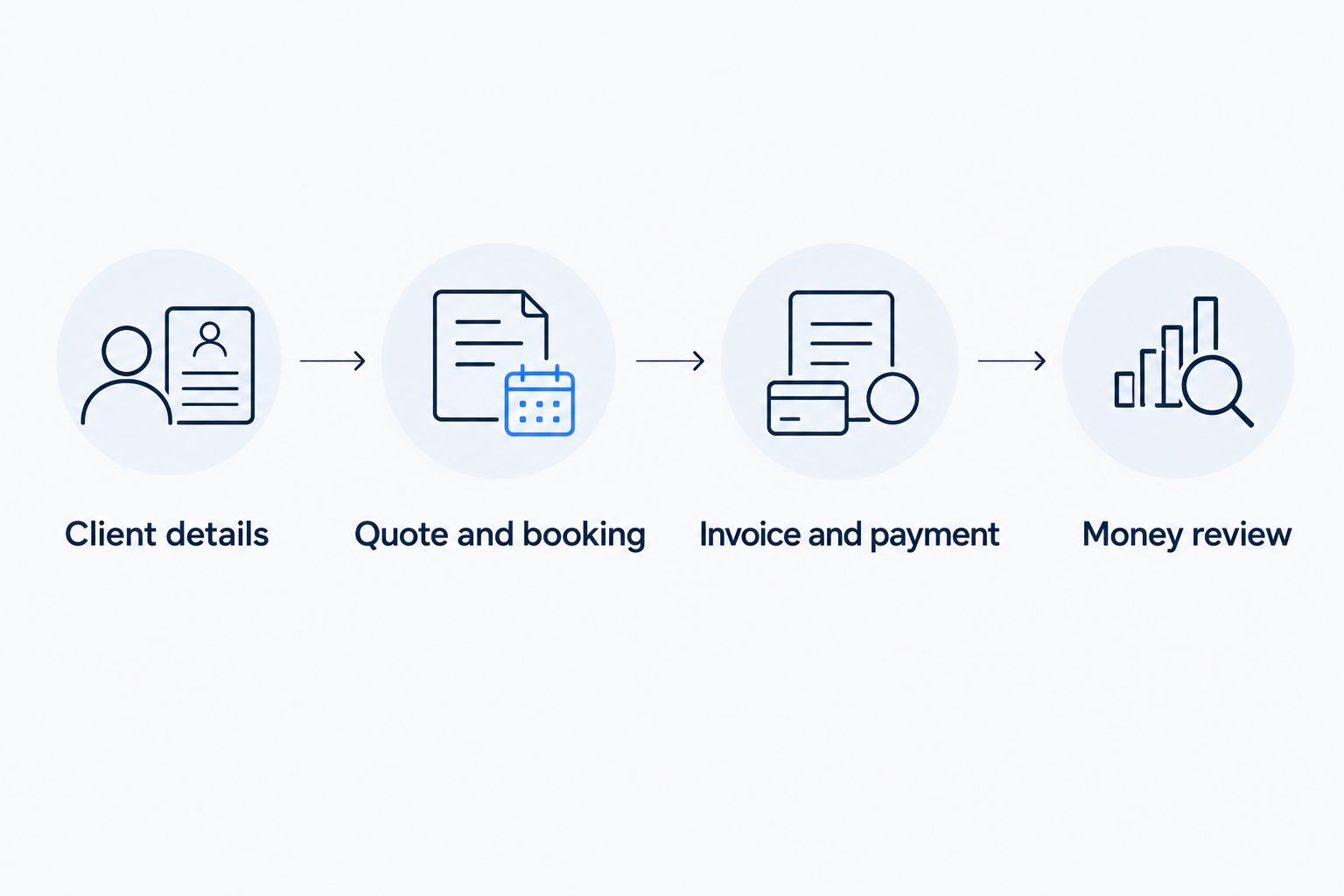
Client details. Use 1 sample portrait booking to check how you record the customer's contact information and the work being discussed. Do not put real customer information into an unfamiliar process just to experiment.
Quote and booking. Use 1 sample event inquiry to work through scope, a quote, and the next step toward an appointment. Pay attention to where you still need a separate message or document.
Invoice and payment. Create 1 sample invoice that describes the agreed work. Read it from the customer's perspective: does the wording make the payment request understandable?
Money review. Decide how income and expenses will enter your business records and how you will review them. Keep that process distinct from delivering photographs or preparing a tax return.
If gallery delivery is your bottleneck, add a separate delivery check using a sample set of photographs. Look at the client's experience as well as your own. The administrative test and the delivery test answer different questions.
Which photography business software should you choose?
Solo Pro is the best photography business software here for owner-operated photographers who want assistant-led booking, invoicing, and business money tracking. Choose HoneyBook when proposals and contracts define your client process, Dubsado when configuring that process is the priority, or Pixieset when gallery delivery is the problem to solve.
For an undecided reader in 2026, start with the work that happens around every paid job. If quotes, reminders, invoices, and expense organization are what you keep postponing, choose the administration-first option. If those tasks already work, do not replace them just to get a better gallery.
FAQ
What's the best photography business software in 2026?
The best choice depends on the work you need handled: assistant-led administration, client agreements, custom workflows, or gallery delivery. Solo Pro supports contacts, quotes, booking, reminders, invoicing, payments, and bank-connected business money tracking.
Is HoneyBook better than Dubsado for photographers?
HoneyBook is the recommendation here for proposal-and-contract-centered client work; Dubsado is the recommendation for configurable workflows. Choose according to whether organizing agreements or customizing the process is your main task.
Is Pixieset just a photo gallery tool?
Pixieset offers client galleries and business tools through Studio Manager. Assess the gallery experience and the administrative tools separately so delivery quality does not decide every part of your software choice.
Can a personalized assistant help run a photography business?
Yes. Sherpa helps import phone contacts, quote jobs, draft booking-page wording, send appointment reminders, and answer questions about business health. Booking, invoicing, payment collection, and bank-connected income and expense tracking are current capabilities.
Does business money tracking replace accounting software?
Business money tracking does not replace full accounting or tax-filing software. Use income and expense visibility to support business decisions while keeping your accounting and tax responsibilities separate.
Do I need editing software and business software?
Editing software and business software handle different tasks. Editing produces the photographs; business software handles work such as client information, appointments, agreements, invoices, or payments.
What should I test before changing photography business software?
Test a sample booking, inquiry, and invoice through the process you intend to use. If gallery delivery is your main concern, evaluate that separately with sample photographs.
One last thing
The best 2026 purchase is not necessarily a replacement for everything you already use. Keep the editing or delivery process that works, and address the administrative task that does not. A clear division of responsibilities is more useful than calling an incomplete setup all-in-one.
Related guides
Best booking software for content creators