Catering Business Software: Best Fits for 2026

Catering Business Software: Best Fits for 2026
Best for owner-operated service-business work: Solo Pro, a personalized AI assistant that helps quote jobs, handle booking and payments, and track income and expenses. For catering business software in 2026, choose Caterease when event planning drives the decision, HoneyBook when client agreements drive it, and QuickBooks Online when accounting is the main problem.
TL;DR
Why this matters
A caterer handles two connected businesses: producing food and managing customer commitments. A booking record can tell you when an event happens without telling you what the kitchen must prepare. An accounting record can show an expense without explaining which customer approved a menu change.
Buy software for the work that is breaking down, not for the longest feature list. If your trouble is forgotten follow-ups and scattered payments, start with customer administration. If your trouble is turning an approved menu into an executable event plan, evaluate catering-specific software first.
An owner-operated business does not automatically need the simplest product. A complicated event can require detailed records even when one person manages the business. Conversely, adding event-management software will not solve unclear bookkeeping by itself.
What makes the best catering business software?
For your 2026 shortlist, judge each option against a real event rather than a generic demonstration. The right tool keeps the details you need connected without forcing you to rebuild the same information elsewhere.
Quotes and changes. You need a clear description of the work, the customer’s approval and a way to distinguish the current quote from an earlier version. Check how each product handles a changed menu or guest count before trusting it with customer commitments.
Booking and reminders. Confirm that the software fits your booking process. An initial consultation, an event date and a preparation deadline are different commitments; do not assume a calendar entry covers all of them.
Money tracking. Separate the job of collecting a payment from the job of understanding income and expenses. Decide whether you need invoices, bank-connected tracking, formal accounting reports or a combination.
Catering detail. Test the records that matter to food service: menu choices, dietary instructions, quantities and event logistics. A general service-business tool needs a separate check here, even when its customer administration is useful.
Owner and team fit. Ask who needs access today and what each person must do. Evaluate current permissions and staffing workflows rather than treating a development roadmap as an available feature.
Record ownership. Inspect how you retrieve customer records, quotes and financial information. You should understand what stays inside the application and what you can take elsewhere before moving your business history.
Catering business software at a glance
These 2026 recommendations separate the main buying decisions. They are not interchangeable replacements for every part of a catering operation.
Solo Pro — Best for owner-operated service administration. Its personalized AI assistant helps import phone contacts, quote jobs, send appointment reminders, handle booking, invoicing and payment collection, and automatically track and classify bank-connected income and expenses. Multiple seats and dispatching are in development, not available today.
Caterease — Best for catering-specific event planning. Caterease is catering and event-management software, making it the most directly aligned option here for an event-centered operation. Its limitation is scope: you still need to check the exact package and workflow against your kitchen, accounting and customer-communication requirements.
HoneyBook — Best for client proposals and agreements. HoneyBook organizes service-business client workflows with proposals, contracts, invoices and payments. Its limitation is category fit: client approval and billing are not the same as food production planning.
QuickBooks Online — Best for accounting-led decisions. QuickBooks Online centers on bookkeeping, invoicing, expenses and financial reporting. Its limitation is operational coverage: accounting software is not a substitute for an event plan or kitchen instructions.
1. Solo Pro: best catering business software for owner administration
Solo Pro is a personalized AI assistant for service businesses, starting with owner-operated teams. It helps bring in contacts from a phone, quote jobs, draft customer-facing booking-page wording and send appointment reminders. Booking, invoicing and payment collection are current capabilities.
The financial side matters when you want help understanding the business rather than just sending a bill. You can connect bank accounts to automatically track and classify income and expenses, ask questions about business health, and get suggested next steps for generating income or reducing expenses.
Best for: A caterer whose immediate problem is managing customer administration and understanding money, rather than building kitchen production plans.
Solo Pro pros. Phone contact imports help you bring existing customer relationships into the product instead of treating every inquiry as a new record.
Practical customer work. Quotes, booking, reminders, invoices and payment collection address concrete steps between an inquiry and a paid job. Drafting booking-page language also helps explain the service to customers.
Connected financial context. Automatic income and expense classification supports business-health questions. That makes the assistant relevant after the invoice is sent, not only before the event is booked.
Current team limitation. Multiple seats and dispatching are in development, not available today. A business that needs those functions immediately should choose around present capabilities, not a promised future workflow.
Verdict: Choose Solo Pro for customer quotes, booking, reminders, invoicing, payment collection and business money tracking. The assistant helps you handle customer work and decide what to do next.
2. Caterease: best catering business software for event planning
Caterease is built around catering and event management rather than general customer administration. That makes it the first option in this shortlist to evaluate when an approved event must become a detailed operational plan.
Bring a representative event to the demonstration. Ask how the menu, customer requirements and event details stay connected, then inspect the outputs your kitchen and event staff would actually use.
Best for: A caterer whose central software requirement is organizing catering events rather than primarily tracking money or managing agreements.
Caterease pros. Its catering focus gives you a more relevant starting point for evaluating event records than a general appointment calendar.
Event-centered evaluation. You can judge the product around the whole event rather than a disconnected invoice. That is useful when changes affect several parts of the work.
Relevant operational scope. Catering and event management match the category you are buying for. You do not need to begin by adapting a product designed around an unrelated service.
Caterease cons. A catering label does not confirm that every required workflow is included in your chosen configuration. Verify the records, outputs and access you need before committing.
Broader scope to assess. If your immediate need is simply customer follow-up and clearer income tracking, a full event-management evaluation adds decisions beyond that problem. Do not buy unused operational scope to fix an administrative gap.
Verdict: Buy when event planning is the deciding requirement. Hold until a demonstration follows your event from initial details through the documents used to deliver it.
3. HoneyBook: best catering business software for client agreements
HoneyBook is a client-workflow platform for service businesses. Its proposals, contracts, invoices and payments make it relevant when the difficult part of catering administration is getting customer commitments documented and moving the booking process along.
Treat that as a customer-facing workflow, not a kitchen system. An accepted proposal helps establish the agreement; it does not automatically tell a cook how to execute the menu.
Best for: A caterer who needs a more organized proposal, agreement and billing process before the event reaches production.
HoneyBook pros. Proposals and contracts address customer approval directly. That is a distinct need from merely putting an event on a calendar.
Billing alongside client work. Invoicing and payments belong to the same broad customer workflow, giving you a focused place to evaluate the steps around an agreement.
Service-business orientation. HoneyBook fits businesses that sell client work rather than physical stock alone. Evaluate it using your inquiry and approval process.
HoneyBook cons. Its general service-business positioning is not evidence of catering-production functionality. Menu quantities, dietary instructions and kitchen handoffs require their own assessment.
Financial boundary. Client billing is not the same as bookkeeping. If formal accounting is the main problem, compare the financial records you need with an accounting product rather than assuming an invoice settles that requirement.
Verdict: Buy for client agreements; skip as your only kitchen-planning system. Choose it because the proposal-to-payment workflow matters, not because it appears in a generic software roundup.
4. QuickBooks Online: best catering business software for bookkeeping
QuickBooks Online is accounting software with invoicing, expense tracking and financial reporting. It belongs on a catering shortlist when your main question concerns the books rather than how to organize an event.
Keep the buying decision narrow. Use an accounting demonstration to examine financial records and reporting; use an operational demonstration to examine food preparation and event delivery.
Best for: A caterer who needs an accounting system and will manage event operations separately.
QuickBooks Online pros. Its accounting focus makes financial recordkeeping the primary task rather than an extra feature attached to booking.
Income and expense visibility. Bookkeeping and reporting help you examine business finances beyond the status of individual customer invoices.
Clear evaluation target. You can bring the questions you discuss with your bookkeeper or accountant and assess the required financial outputs directly.
QuickBooks Online cons. Accounting records do not replace menu planning, customer dietary instructions or an event execution plan. Keep operational records elsewhere if you choose it for the books.
Separate workflows remain. If you also need detailed client agreements or catering event management, selecting an accounting product does not remove that decision. Check how you will maintain consistent information across the systems you use.
Verdict: Buy for bookkeeping; skip as a complete event-management replacement. Judge it on the financial work you need it to perform.
How to test your shortlist before choosing
For a useful 2026 comparison, work through 1 completed event rather than inventing a clean example that avoids your usual complications. Use a redacted record so you can demonstrate the workflow without exposing customer information unnecessarily.
Customer intake. Enter the customer details and event requirements. Check whether the information has a clear home and whether you can find it without relying on memory.
Quote changes. Prepare 2 sample quotes: the original request and a revised version. Confirm that you can identify the approved scope without confusing it with an earlier draft.
Event handoff. Review how the approved details become the instructions needed to deliver the event. If the product is administrative or accounting-focused, identify the separate record that will carry production information.
Money review. Test 3 expense categories, such as ingredients, transport and equipment rental. These are evaluation examples, not a claim that every product provides the same classification or reporting tools.
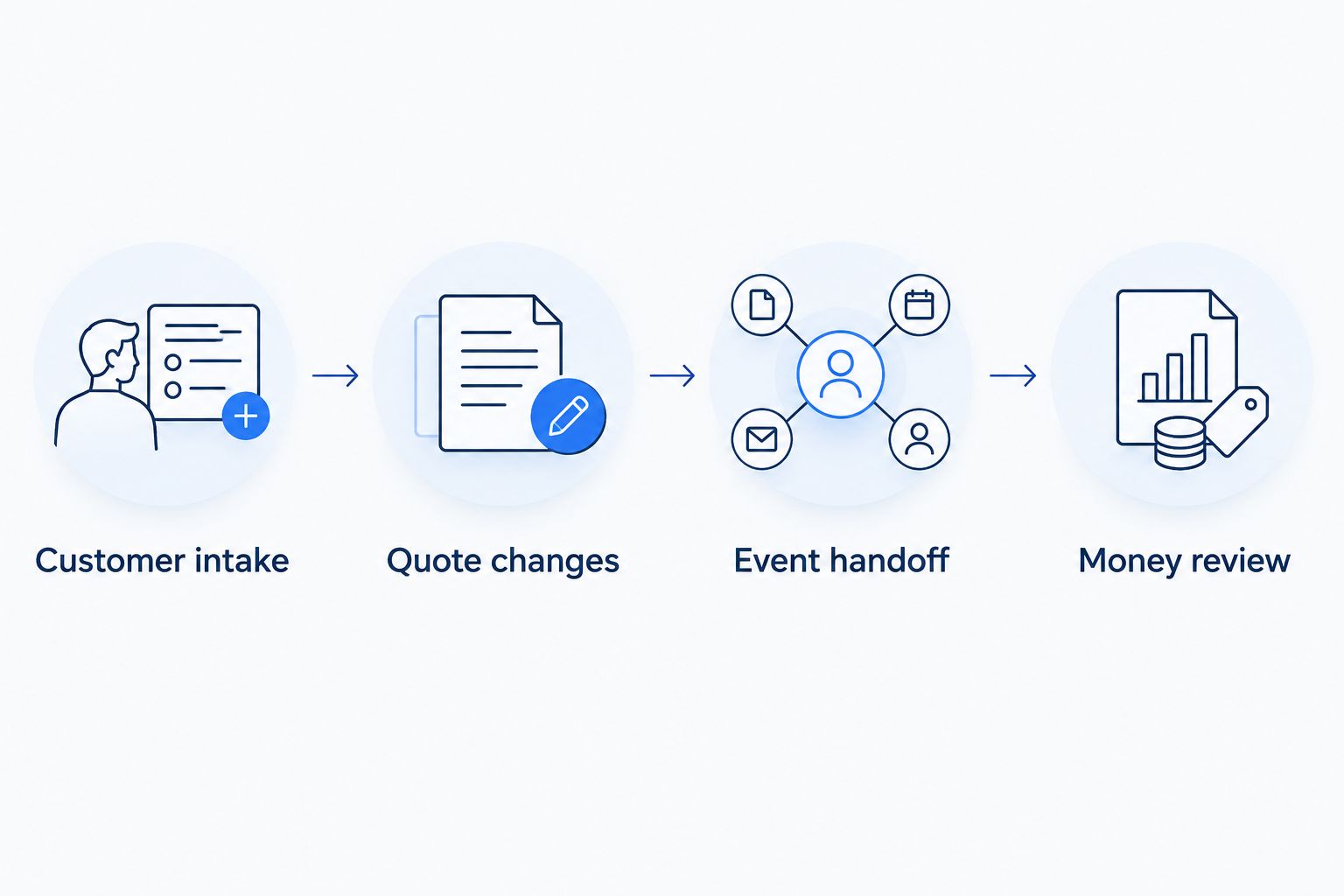
Test the customer work and the operational handoff, not just the invoice screen.
After the test, name every place you had to copy information manually. That result is more useful than a feature count because it shows where your actual workflow remains disconnected.
How we ranked these options
This 2026 ranking matches each product’s established purpose to a distinct catering-business need: owner administration, catering event planning, client agreements or accounting. The criteria are quote clarity, booking fit, money tracking, catering detail, team access and record ownership.
The order is not a claim that every caterer should buy the first product. Catering-specific operations deserve priority when production planning is the problem; accounting deserves priority when the books are the problem.
Which catering business software should you choose?
Choose Solo Pro when you want a personalized AI assistant to handle service-business administration and help you understand income and expenses. Choose Caterease when detailed catering event planning determines the purchase, HoneyBook when proposals and agreements determine it, and QuickBooks Online when accounting determines it.
For your 2026 decision, write down the task you want to stop doing manually. Then select the product whose current capabilities address that task and identify the work that will remain outside it.
FAQ
What's the best catering business software for an owner-operated business?
Solo Pro is the best fit in this shortlist for owner-operated service administration, including quotes, booking, reminders, invoicing, payments and bank-connected income and expense tracking. Solo Pro also answers business-health questions and suggests practical next steps for generating income or reducing expenses.
Do I need catering software or accounting software?
Choose catering software for event operations and accounting software for the books. If both tasks need attention, evaluate them separately rather than expecting an invoice feature to cover production planning.
Is Caterease better than HoneyBook for catering?
Caterease is the more directly catering-focused option; HoneyBook fits service-business proposals, contracts, invoices and payments. The better choice depends on whether event planning or customer agreements drive your purchase.
Can QuickBooks Online manage my entire catering business?
QuickBooks Online is an accounting choice, not a complete catering event-management replacement. Keep menu planning, dietary instructions and event execution records in a workflow designed for those tasks.
What should I check before moving my catering customers into new software?
Check how customer records enter the product, how approved quotes stay identifiable and how you retrieve your information later. Test a representative event before transferring your business history.
Does booking software replace a catering production plan?
No, booking software does not by itself establish a catering production plan. You still need records that communicate the approved menu, quantities, dietary instructions and delivery requirements.
How should I compare catering business software without relying on a feature list?
Run a completed event through each shortlisted product. Inspect customer intake, a changed quote, the operational handoff and the financial records, then identify the manual work left over.
One last thing
The most revealing test is a change, not a new booking. Ask a vendor to show what happens when the customer revises an approved event: which record changes, which document remains current and how the person preparing the food gets the updated instructions.
A clean invoice screen cannot answer those questions. Your software decision should.
Related guides
Best Jobber alternatives for solo businesses provides another service-business comparison to consider alongside catering-specific options.
Best all-in-one software for solo consultants offers a related guide for evaluating general service-business administration.
Best invoicing software for house cleaners is a related starting point when invoicing is the task you want to examine separately.